
Azure Cosmos DB IDE
& Graph Visualization Tool
Explore, query and visualize your graph data in Azure Cosmos DB with gdotv.
A Purpose-Built IDE for Azure Cosmos DB Developers
gdotv can be fully integrated with Azure Cosmos DB’s Gremlin API, including the Azure Cosmos DB Emulator. It’s easy to use and allows you to perform essential graph database management and reporting tasks effortlessly.
gdotv features a cutting-edge Gremlin development toolkit that provides accurate auto completion based on your graph data model, as well as syntax checking to help you write better queries, faster. It also comes bundled with the official Gremlin query language documentation to keep you right at every step of your query.
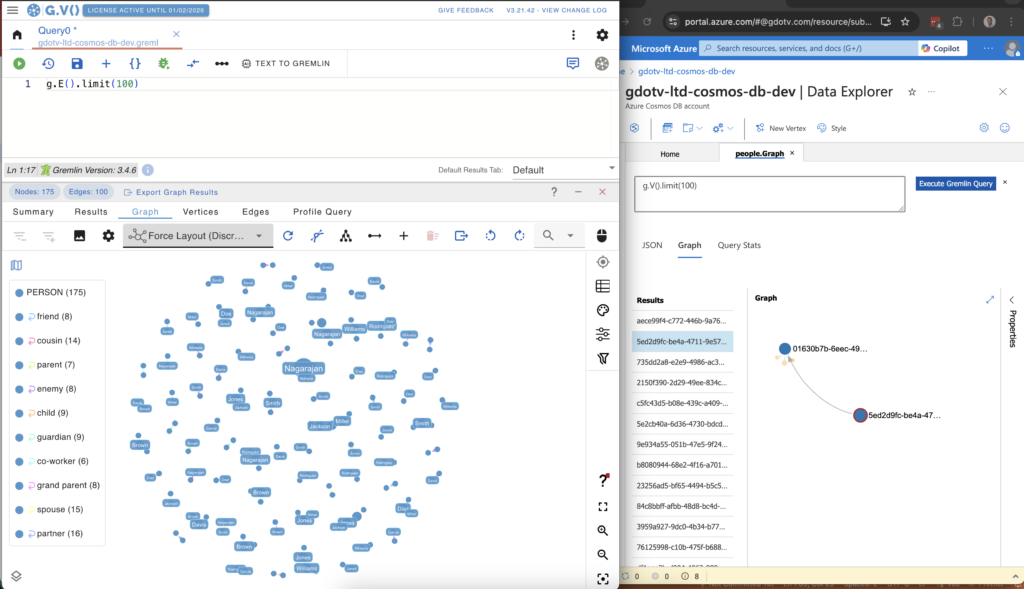
The gdotv graph database browser allows you to analyze relationships in complex datasets without needing to write a single-query and offers you intuitive graph layout, navigation, filtering and editing components to help you get answers from your data in just a few clicks.
 Azure Cosmos DB
Microsoft Corporation
Query languages supported by gdotv: Gremlin
Learn more about Azure Cosmos DB
Case Study:
Endeavour Harnesses gdotv to Map & Manage Their Sustainable Infrastructure
Tasked with monitoring complex data center infrastructure, the Endeavour team found it difficult to visualize their graph data model in Azure Cosmos DB – let alone communicate that context with other stakeholders. Using gdotv, the Endeavour team could more efficiently update their data center digital twin, trace complex customer usage, and share graph visualizations with partners and customers.
An Overview of Azure Cosmos DB
Azure Cosmos DB is a graph database service offered by Microsoft. It’s key strength is its ability to manage data at a massive global scale, up to and including graphs containing billions of vertices and edges.
Cosmos DB is built on the open source Apache TinkerPop™ framework and uses the Gremlin graph traversal language. The service is fully managed by Microsoft, ensuring that you can access information quickly, no matter where you are on the planet. Cosmos DB is suitable for a wide range of use cases, from ecommerce and gaming to Internet of Things (IoT) projects.
Azure Cosmos DB is a robust, scalable backend for applications that need to be fast, always on, and globally accessible.
What’s Possible with Azure Cosmos DB + gdotv
Secure by Design
gdotv runs directly on your local device as a software executable. This means that unlike solutions deployed over a network, gdotv is only accessible to you – the user – and does not expose any functionality outside of your device.
All of your data is processed locally in the executable and within your network, just like traditional database clients such as MySQL Workbench.

Centralized Connection Management

gdotv can be used to query and compare data from a huge range of graph database vendors – simultaneously! We don’t just work with Azure Cosmos DB: gdotv data visualization tools fully integrate with various other graph technologies, including all Apache TinkerPop™ compatible graph databases and most LPG and RDF providers.
gdotv is fully compatible with query languages like Gremlin, Cypher, Google SQL, SQL:2023, SPARQL and more. Using an intuitive UI, you can switch between your connections and queries seamlessly.
Easy Installation & Setup

Effortlessly integrate gdotv with your Azure Cosmos DB graph database with a simplified plug-and-play database connector. The gdotv database client provides straightforward database connection and configuration instructions to get you started in less than a minute.
This Cosmos DB IDE is available to download for Windows, macOS, and Linux with a one-click installer to get you started instantly.
Customizable Data Visualization

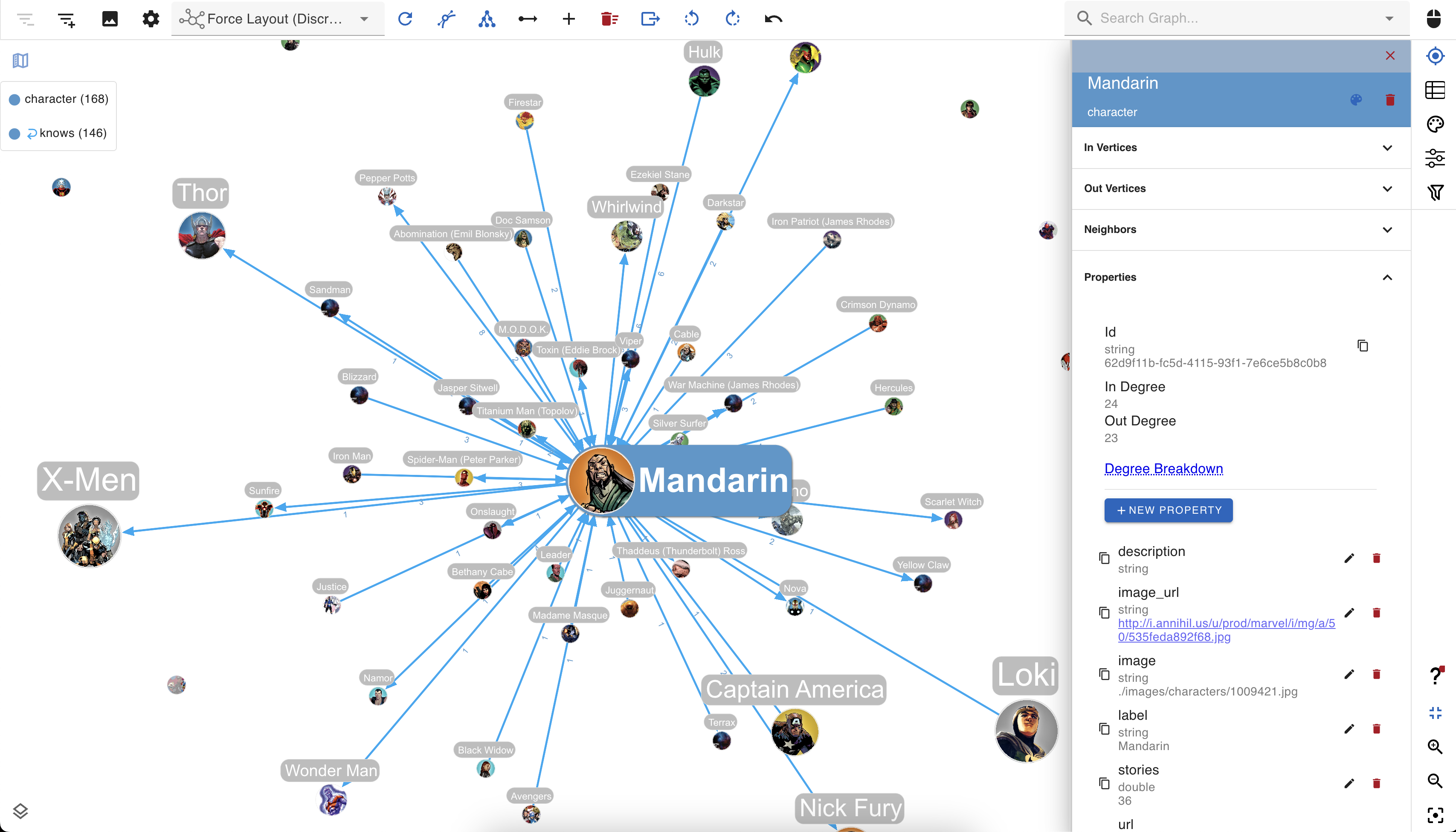
You can create custom visualization rules for your graph database with gdotv to determine the look and feel of your data.
The gdotv database client boasts easy-to-configure style options that you can use to customize vertices and edges based on their labels and property values.
You can choose any color, size, or background image and adjust other elements to match your preference.
Instantly Load & View Your Data Model
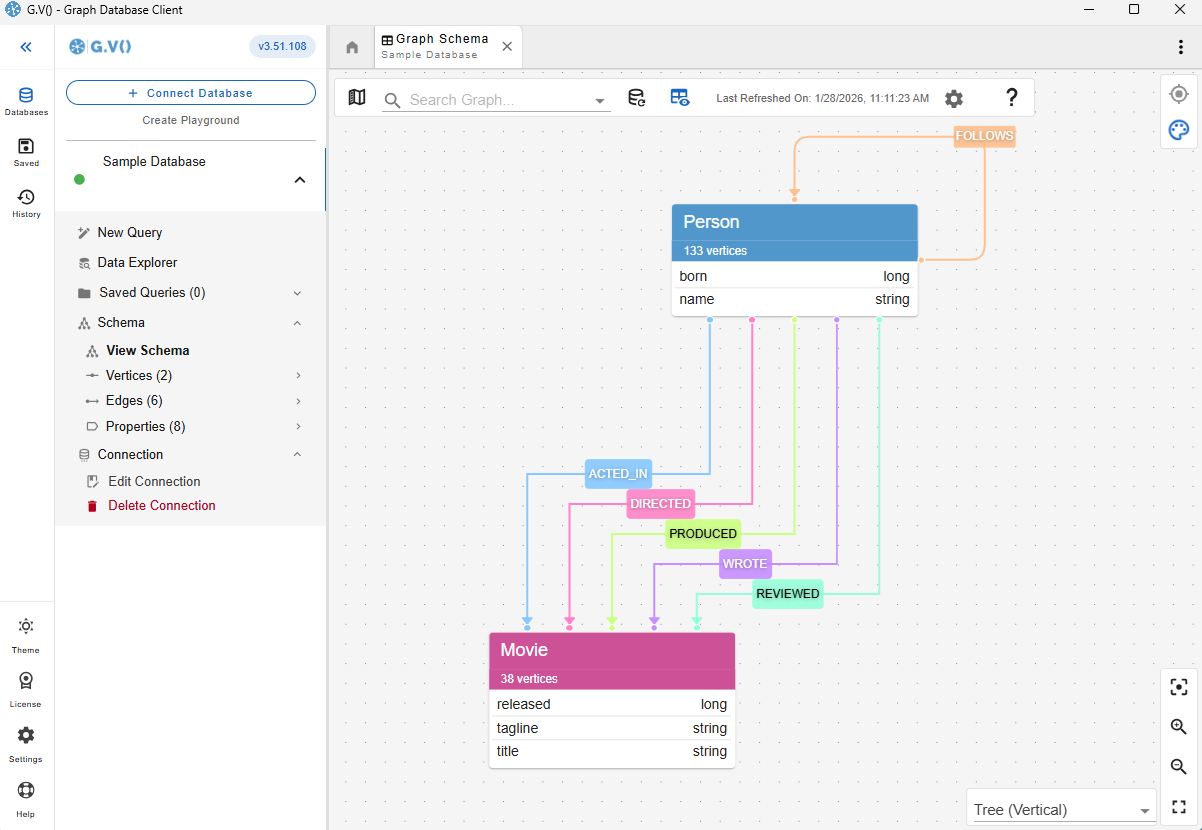
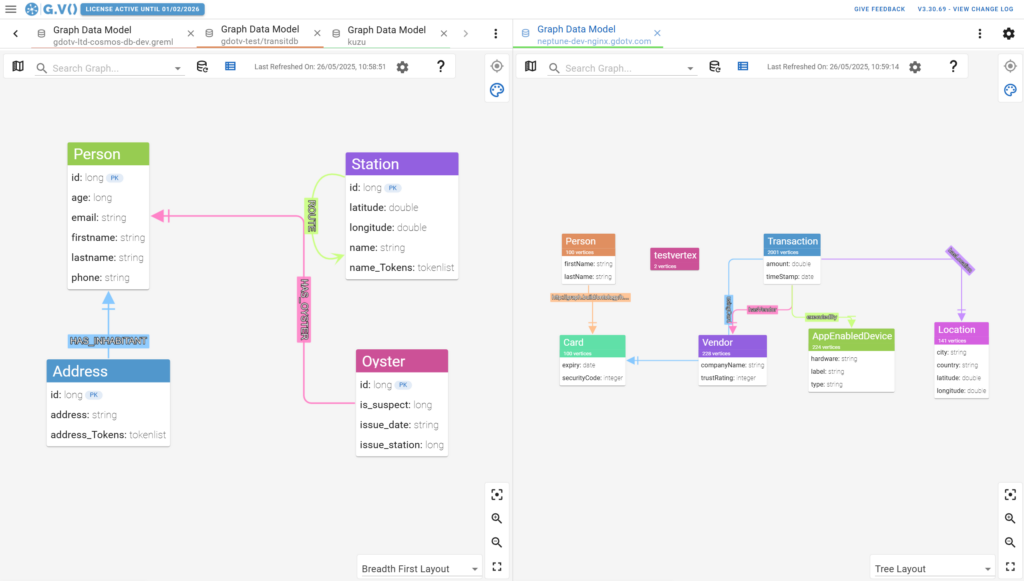
Understanding and verifying your data schema is critical component of graph data management. This is why gdotv provides an overview of your data structure with the data model view.
For Azure Cosmos DB, there is no need to provide a data model, as gdotv is able to infer your schema directly from the data itself. This is always just a click away, meaning that you always have an bird’s-eye view of your vertices, edges, and properties right at your fingertips.
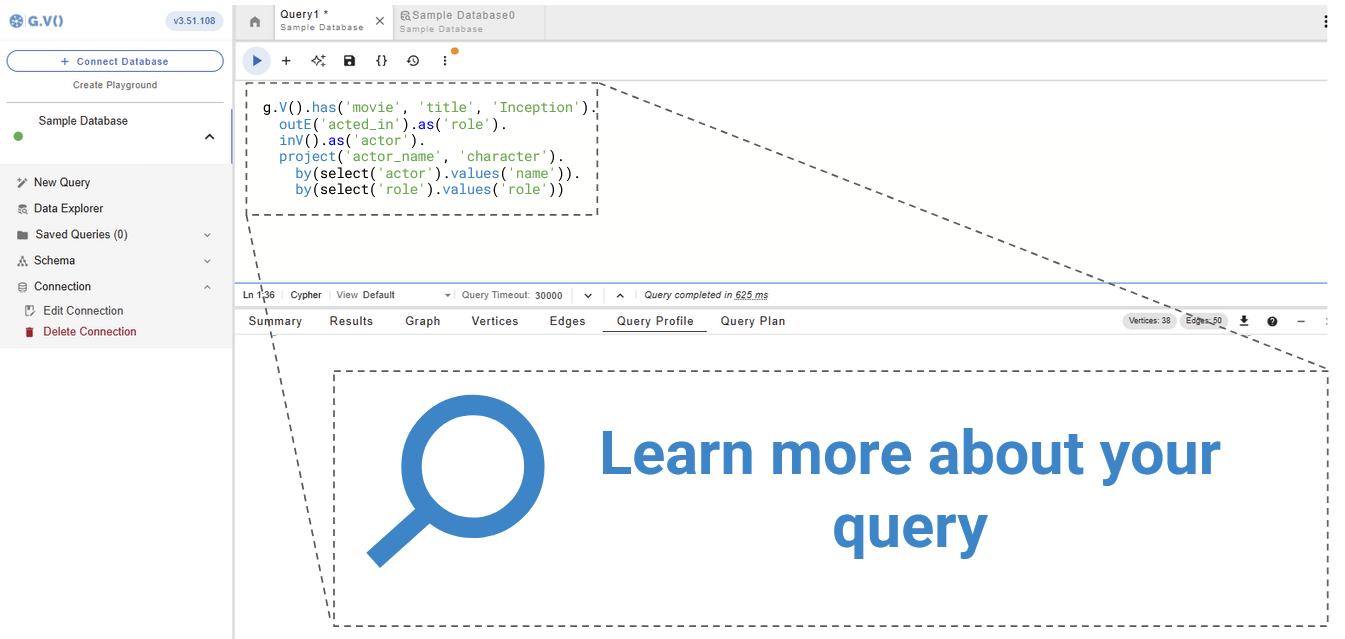
Get Query Profiles & Traversal Explanations in 1 Click
Profiling and debugging graph queries is core to ensure you’re retrieving graph data both optimally and efficiently.
When you take advantage of query profiling in gdotv, you break down your Azure Cosmos DB queries into their individual components, allowing you to execute partial queries for unit testing and debugging.

Modify Your Azure Cosmos DB Graph Data Directly within gdotv
Want to adjust something in your graph? Take a hands-on approach and manage your Azure Cosmos DB graph directly.
Using gdotv, you can directly create, modify, and delete the edges and vertices – as well as modify the properties associated with them – allowing you to make changes on the fly.

Take Advantage of Syntax Validation
Using gdotv language highlighting and syntax checking for Gremlin makes your code easier to understand and visually parse, warning you of any error that would prevent it from executing against your Azure Cosmos DB instance.
Test Azure Cosmos DB Queries with the gdotv Debugger
The combination of the gdotv query debugging and profiling toolkit gives you unparalleled control to inspect the behavior and output of your graph traversals with just a few clicks.


State-of-the-Art Gremlin Editor
The gdotv Gremlin code editor is the most powerful available – it offers data schema-accurate auto completion and embedded official documentation for Gremlin to give you all the information and suggestions you need to write your Azure Cosmos DB queries faster and more effectively.
Azure Cosmos DB + gdotv Blog Posts
![The Weekly Edge: Hyper/Knowledge Graphs, Advanced Neo4j Spatial, Hot Takes from Texas, & More [30 January 2026]](https://gdotv.com/wp-content/uploads/2026/01/data-day-texas-neptune-analytics-neo4j-spatial-weekly-edge-30-january-2026-1024x535.png "The Weekly Edge: Hyper/Knowledge Graphs, Advanced Neo4j Spatial, Hot Takes from Texas, & More [30 January 2026]")
![The Weekly Edge: Hydra Goes Translingual, Graph Data Science for Rust, Knowledge Graph Mother Lode, & More [23 January 2026]](https://gdotv.com/wp-content/uploads/2026/01/knowledge-graphs-cosmos-db-hydra-graph-programming-language-weekly-edge-23-january-2026-1024x535.png "The Weekly Edge: Hydra Goes Translingual, Graph Data Science for Rust, Knowledge Graph Mother Lode, & More [23 January 2026]")
Frequently Asked Questions (FAQs)
gdotv: The Azure Cosmos DB IDE
Turn your graph data into connected insights when you use gdotv to query, explore, and visualize your Azure Cosmos DB graph database.
Sign up for a free trial today and discover how gdotv amps up your productivity as the perfect Azure Cosmos DB IDE and graph visualization tool.
Or, prefer to talk with the gdotv team directly? Use the form below to get in touch.