RDF Support Is Now Available in gdotv [v3.41.99 Release Notes]

It’s here at last: RDF support for gdotv!
The gdotv 3.41.99 release is a special one representing six months of work by the team to include this new functionality and support for a huge segment of the graph technology ecosystem.
As graph enthusiasts know, the graph landscape has long been separated into two main models: the Resource Description Framework (RDF) approach and the Labeled Property Graph (LPG) approach. Until today, gdotv has only been compatible with LPGs, but as of today gdotv now fully supports both these pillars of the graph tech industry.
RDF is a well-established format, highly standardized and dating back to the early days of the semantic web. It describes entity-relationship structures, similar to LPGs, but RDF is based on a model built out of subject-predicate-object statements known as triples. Known for offering a high degree of interoperability and scalability, RDF has been widely adopted since its initial introduction in 2004 and enjoys significant community support.
We’re excited to welcome all fans and customers of RDF, as well as an entire suite of initial RDF partners and vendors, including:
(If your RDF triplestore of choice isn’t on this list, worry not! It should still work on gdotv, but we just haven’t got around to testing it yet. Rest assured we’re already working on it.)
Let’s take a more detailed look at a few features of using an RDF triplestore with gdotv.
Connecting to Your RDF Triplestore
In gdotv, you connect to an RDF database directly from the welcome screen by clicking New Database Connection and selecting one of the many RDF triplestores gdotv now supports:
- Amazon Neptune
- Stardog
- GraphDB
- QLever
- Tentris
- AllegroGraph
- Virtuoso
- RDF (Other)
From here, all you need to do is enter your SPARQL URL and authentication details:
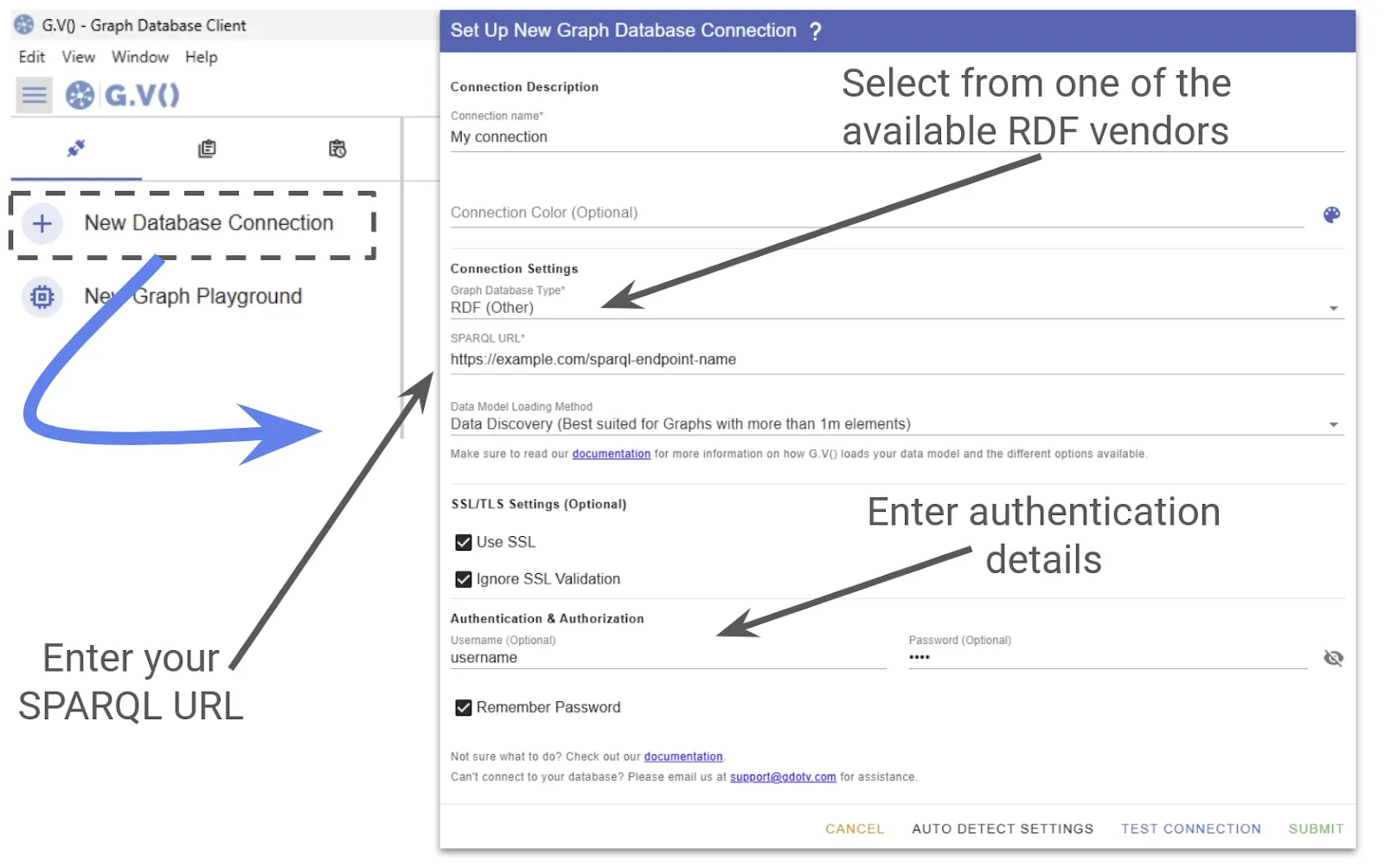
As you see above, connecting to gdotv is straightforward, and you’ll be able to visualize your graph database in seconds.
Using SPARQL Query Language with gdotv
Regular users of RDF are familiar with SPARQL – a standard query language used with RDF triplestores. SPARQL is tuned to the unique demands of the RDF framework, such as parsing triples and URI locations.
When you connect to your RDF database, you can use SPARQL directly within gdotv’s Query Editor, allowing you to interface with your database using standard queries you’re likely already familiar with, such as:
SELECT: gets specific data from the RDF graph via triple patterns and shows it as a table or a visual graphASK: checks if certain data exists and returns true or falseDESCRIBE: gives detailed RDF information about a given resource.CONSTRUCT: creates a new RDF graph based on matching dataUPDATE: adds, removes, or changes triples in the dataset
Here’s an example SELECT query using SPARQL in the gdotv Query Editor.
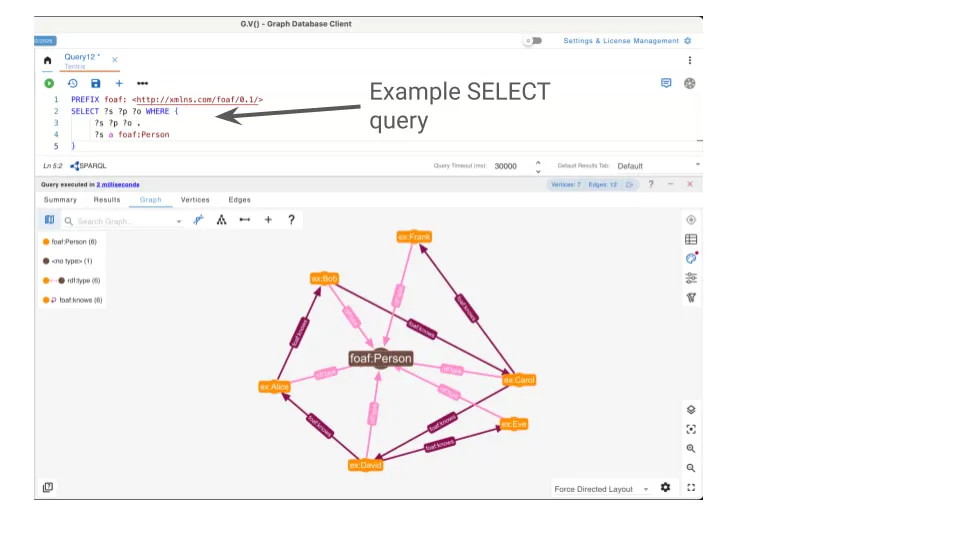
SPARQL query results are often large tables filled with long IRIs that are difficult to follow and interpret. In gdotv, the Graph Visualizer helps you make sense of your data visually.
When you run a query, gdotv automatically detects entity nodes in the result, fetches the most relevant literals from the database in addition to your query output, and then builds the appropriate edges between nodes based on your query patterns. Whether your SPARQL query contains simple or complex graph patterns, gdotv intelligently discovers and visualizes all of them.
You also don’t need to worry about long IRIs. You can define custom RDF namespace prefixes in the settings, and gdotv uses them consistently to display shorter, more readable identifiers throughout the graph.
For visual clarity, gdotv applies a consistent labeling model to RDF graphs. Each node is assigned a label based on its rdf:type, ensuring alignment with LPG semantics. When no type is defined, the node is displayed as <no_type>. In RDF, edges do not carry explicit types or properties, thus gdotv keeps their representation minimal and clean.
gdotv also supports autocomplete for SPARQL. Just start typing your query, and you’ll get smart hints and code suggestions based on the current SPARQL clause, from keywords to data model vocabularies. You can also import your global prefixes (defined and editable in the Default RDF Prefixes Settings) directly into the editor. Simply begin typing with the prefix namespace, and gdotv automatically inserts the corresponding PREFIX declaration into your query.
Add, Edit & Delete RDF Nodes & Edges in the Graph View
One of the great things about the gdotv interface is the ability to directly interact with your graph just from the UI.
gdotv lets you add and delete individual nodes by hand – meaning you don’t have to write queries just to make small changes. Just click on the Add Vertex button to add new nodes, or Enable Edge Drawing to construct edges between existing nodes. You can always delete an edge or node by clicking the Trash icon.
With RDF triplestores, this functionality is no different. Just as with LPGs, you can modify nodes and edges directly within the Graph View. When you confirm the operation, gdotv creates the equivalent triples according to your data and performs proper update queries.
See below for an example of these data editing features.
But watch out: With the deletion of a node, all outgoing and incoming edges to and from the node will be eliminated from the graph.
As everything in RDF should be a triple at the end, you should note that it is not possible to add a vertex (an entity) to the dataset without any initial relation, but if you specify just a type or at least one literal, you’ll be fine.
Add Vertex Literals in the Graph View with Support for Literal Data Types & RDF Language Tags
In the gdotv environment, RDF literals can be managed just like properties of nodes and edges in LPGs with one important difference: In RDF, edges cannot have direct literals or properties.
Instead, you simply select a node to add any number of literals by entering the literal key (predicate), literal type, literal language tag, and finally the value. See the example below.
When adding literals, if the literal key (predicate) you want to add exists in the data model, you have to use the same data type.
In the RDF framework, literals may come with language tags, which describe the language of the literal text string. If a literal has a language tag, it will be displayed as @<lang>.
No-Code Data Exploration in RDF with the Graph Data Explorer
The Graph Data Explorer in gdotv allows you to traverse nodes and edges in your graph according to custom criteria and pattern matching – all without manually writing queries. Today’s release includes this functionality for RDF databases as well!
To get started with no-code data exploration, just click on the Graph Data Explorer button on the left-hand side, under your database connection. You’ll be taken to the input screen, where you select the shape of the entity or path you want to look for. gdotv only shows you nodes and edges that are available in your graph since it automatically imports the schema knowledge from your database.
To help you narrow down your search, you can also apply additional filters on entities to further constrain your data. For example, you could apply the EndingWith filter to the foaf:name literal of your nodes as follows:
SPARQL Query Profiling
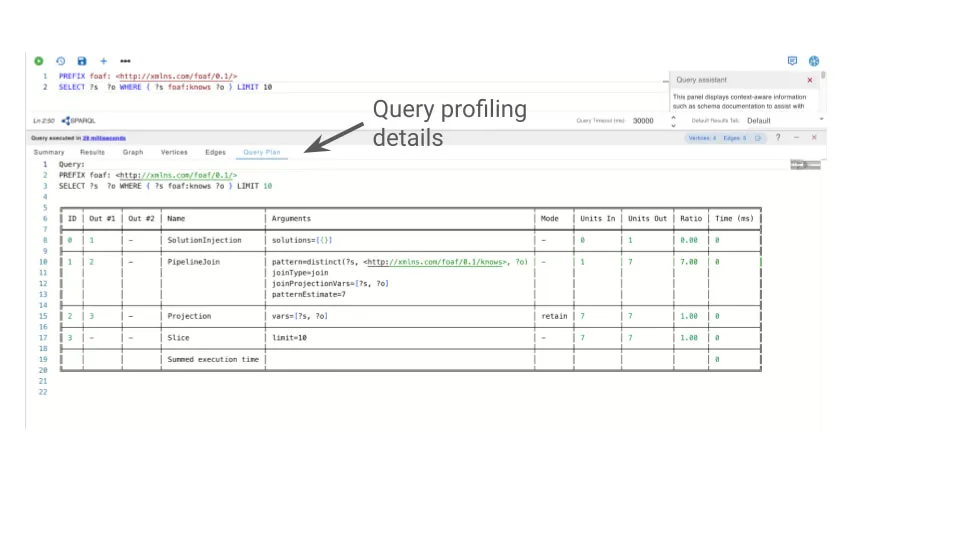
If your RDF database supports profiling, a Query Plan will also be available with SELECT queries. The image below shows you where to find this feature in the gdotv UI.
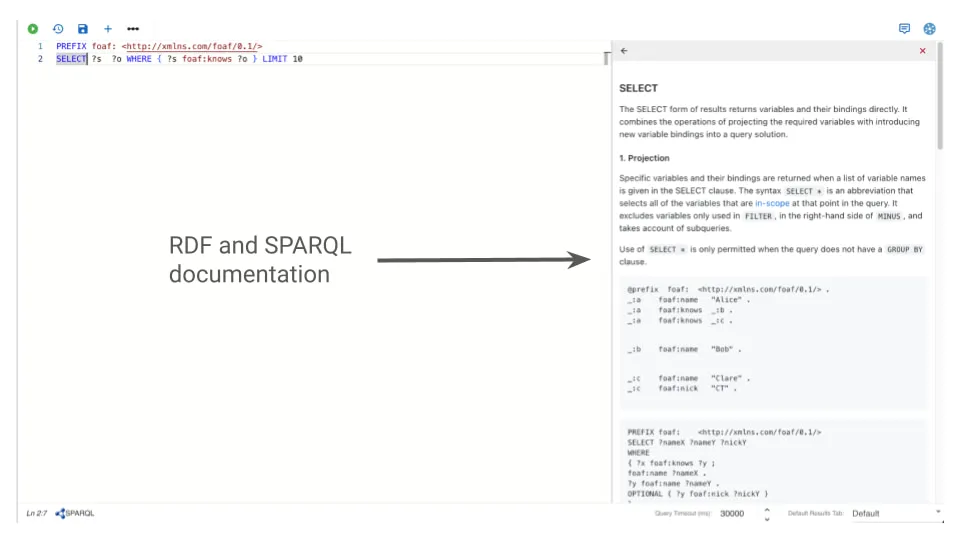
Embedded SPARQL & RDF Documentation
If all these new features seem like a lot, don’t worry. To help you keep track of all this information, the gdotv interface includes additional embedded documentation to help you navigate the new world of RDF data exploration!
In order to find it, just start typing queries or move your cursor to different parts of your query, like in the example shown below.
Future Work
In upcoming releases, we plan to extend RDF support in gdotv with deeper support for schemas, ontologies, and class hierarchies. Existing features will become even more powerful through full recognition of T-box metadata.
Future versions will introduce support for complex query patterns (including extended operators such as ***** and +, improved visualization of federated SPARQL queries, and new ways to render multiple Named Graphs within a single triplestore.
Conclusion
That’s it for this new release of gdotv – and what a monumental one this is!
We’ve been working on integrating RDF support for a long time, and we’re so excited the day is finally here. This is a big expansion to the functionality of gdotv, and it’s an honor to support such a well-established and respected heavyweight sector of the graph industry.
Check out the new RDF functionality, and let us know if it’s everything you dreamed of! The gdotv team runs on user feedback, so tell us what new updates – RDF or otherwise – you’d like to see in upcoming releases.
About the author

Dr. Seyed Amir Hosseini Beghaeiraveri
Data Scientist
Amir holds a PhD in Computer Science from Heriot-Watt University and recently completed his postdoctoral fellowship in Large-Scale Nested Data Processing at the University of Edinburgh's School of Informatics. He brings several years of experience in graph-based structures and semantic web technologies to the team, with a focus on data processing and validation. As a long-time RDF user, he leads the continuous design and implementation of solutions for RDF/SPARQL users at gdotv.