
Databases
Google Cloud BigQuery Graph IDE and visualization tool
Connect gdotv to Google Cloud BigQuery Graph, then query, visualize and debug your graph in one workspace. Free three-week trial on Windows, macOS and Linux.
Get started
Easy installation and setup
Effortlessly integrate gdotv with your Google Cloud BigQuery Graph database with a simplified plug-and-play database connector. The gdotv database client provides straightforward database connection and configuration instructions to get you started in less than a minute.
This Google Cloud BigQuery Graph IDE is available to download for Windows, macOS and Linux, with a one-click installer to get you started instantly.
State-of-the-Art GoogleSQL Editor
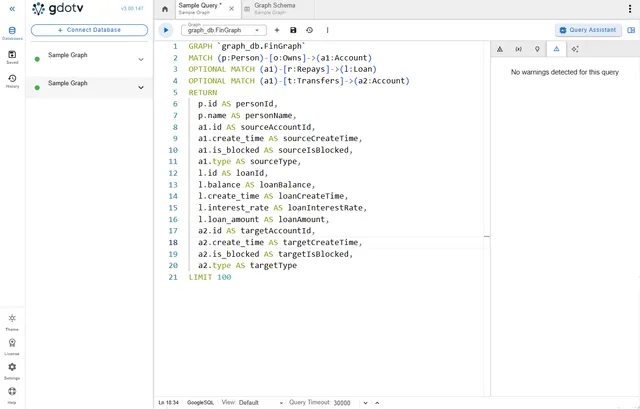
The gdotv GoogleSQL code editor lets you compose your Google Cloud BigQuery Graph queries right within the gdotv interface, allowing you to visualize whatever aspect of your data you like.
Explore, Manage and Modify your Graph
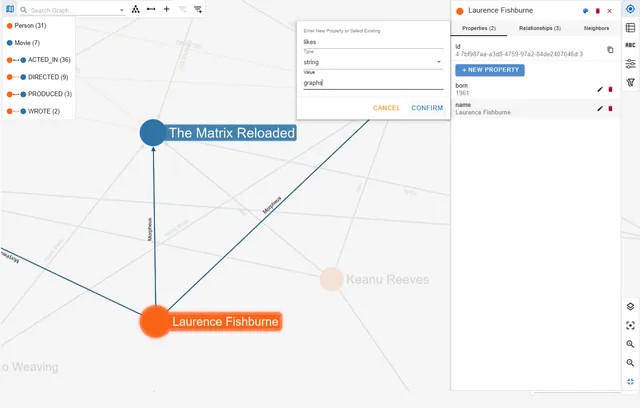
Effortlessly traverse your graph with the no-code Data Explorer, the data model view, interactive layouts, and customization panels to manage and even edit your graph on the fly.
Dashboards, Profiles and Visualization
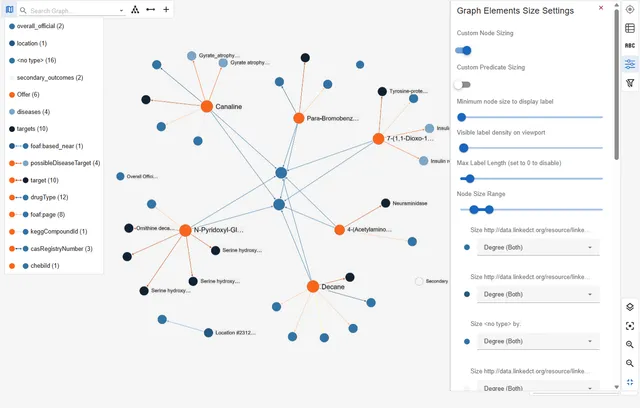
Communicate the most important elements of your graph using gdotv’s visualization and analytics tools, which are designed to convey key insights to both technical and non-technical audiences.
Try gdotv with Google Cloud BigQuery Graph
Query, visualize and model your Google Cloud BigQuery Graph data on your laptop, in your own cloud or across the whole team.
gdotv Desktop
The ultimate graph database IDE.
Install and connect your first graph database in 2 minutes.
gdotv Team
The unified workbench for graph data teams.
Deploy to your team in under 15 minutes. Marketplace or self-hosted.
gdotv Enterprise
The universal graph intelligence platform.
For organization-wide deployments. Bring graph data directly to your analysts.
About Google Cloud BigQuery Graph
BigQuery Graph brings native property graph capabilities to Google’s BigQuery data warehouse, letting you model and query connected data at massive scale without leaving your existing data environment. Powered by GQL and fully interoperable with SQL, it offers intuitive pattern matching and relationship traversal.
You can use gdotv to easily connect to your BigQuery Graph database, then perform essential day-to-day graph database development and management tasks such as querying, data analysis, data management, debugging, testing and visualization.
Learn more about Google Cloud BigQuery Graph in the BigQuery graph documentation.
Frequently asked questions
How can I get started with Google Cloud BigQuery Graph and gdotv?
Getting started with Google Cloud BigQuery Graph and gdotv is easy. It’s just one simple installation, available on Windows, macOS and Linux. No prerequisites, additional configuration or installation required. You can get started in seconds.
gdotv automatically detects your connection setting requirements based on your database hostname and prompts you for the required information for an easy onboarding experience.
Want a step-by-step walkthrough? Make sure to check out our demo, Get Started with Google Cloud BigQuery Graph + gdotv on YouTube.
Why use GQL (Graph Query Language)?
GQL is an ISO standard language designed for property graphs. It makes the use of graphs straightforward by providing a common structure of language and features that all graph database providers can leverage directly in their technologies.
Since Google Cloud Spanner is a multi-model database with support for relational and graph database, it has combined both querying formats under GoogleSQL, offering an unprecedented degree of flexibility and interoperability between SQL and ISO GQL.
What’s the advantage of using LPGs over RDF?
Graph databases typically fall into two models: Labeled Property Graph (LPG) and Resource Description Framework (RDF).
The LPG model covers a broad class of databases, including Google Cloud BigQuery Graph, that use nodes, edges, properties and labels to represent graphs. They are optimized for real-time use and excel in applications like fraud detection, social network analysis and recommendation algorithms. There are also a wide range of methods to enforce schema compliance, with flexible conventions and definitions.
The RDF model refers to a highly standardized form of data management using global identifiers. Information is stored as a series of directed “triple” statements connecting a subject, predicate and object together. In addition, various languages built on RDF (such as RDFS and OWL) allow the construction of sophisticated ontologies and semantic reasoning. The high level of standardization also simplifies data integration from disparate sources. This makes RDF ideal for applications in large knowledge graph construction and research.
LPGs excel when performance and ease-of-use are a priority. Users typically find LPGs more intuitive, and they can be tailored to specific use-cases quickly and easily without the semantic complexity or steep learning curve of RDF.
What graph data visualization scenarios do our customers implement?
Organizing data derived via powerful data visualization tools has several real-life applications. Graph visualization and analysis resources allow users to make informed decisions based on actual data. Here are a few examples of the type of companies or clients that can leverage Google Cloud BigQuery Graph along with the robust data visualization aspect offered by gdotv:
- Data scientists and managers: Visual data analysis allows users to uncover and understand emerging patterns and relationships between data points, discover valuable insights to make informed decisions on ways to transform business processes.
- Cyber security groups: Build security graphs to represent protected assets, infrastructure, code dependencies or networks and visualize the connected relationships throughout the organization.
- Business intelligence analysts: Create customized reports and visualizations that can be easily executed for analysts to investigate and communicate on interaction between business data points.
- Fraud detection: Detect fraud patterns by modeling relationships between transactions and financial actors, then interactively visualize graph data to uncover and present potentially suspicious behavior.
How does gdotv secure my data?
gdotv Desktop runs locally on your device – no deployment needed and no handing over your data to a third-party system. Everything happens within your organization’s network, and we have no access to your data.
Our Team and Enterprise versions run within your own environment, providing the same security benefits.
It’s easy to install and configure too: our setup wizard gets you connected to your graph database in seconds.
Can I connect more than one database at a time?
Yes! Whether you’d like to access multiple Google Cloud BigQuery Graph instances, or interact with other graph vendors at the same time, gdotv doesn’t limit you to a single database. You can establish as many connections as you like from within our intuitive UI, and seamlessly switch between them.
Connecting is easy, and there’s no need to manage multiple vendor specific user interfaces. With gdotv, query and compare results from all your RDF and Labeled Property Graph databases under one umbrella.
Related posts
All blog posts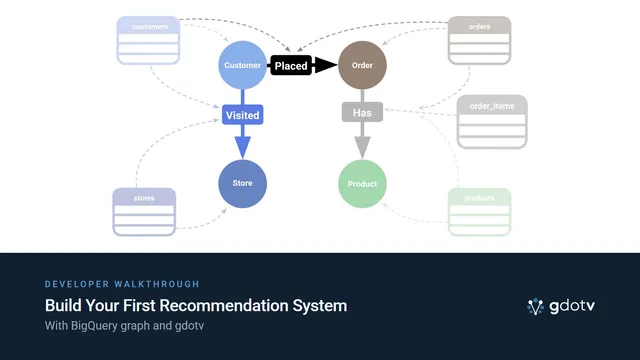
Build Your First Recommendation System with BigQuery Graph
Learn how to build and construct recommendation systems using graphs by following this Google BigQuery demo with gdotv.
A Landscape of the Emerging Graph on Relational Category
Learn how graph-on-relational engines work in 2026: PuppyGraph, SQL:2023, ISO GQL, hyperscalers, and Prometheux. A deep dive into the category.
Introducing AI Query Generation and Cypher Dialect specific autocomplete [gdotv v3.61.129 Release Notes]
Explore the latest release of gdotv, featuring a brand new LLM chat interface, dialect aware Cypher autocomplete, and more!
The Weekly Edge: BigQuery Graph Goes Big, RDF 1.2 Advances, TinkerPop Hatches 3 New Gremlins, & more
Catch up on what’s new in graph tech this week, including BigQuery Graph’s debut, another RDF 1.2 milestone, TinkerPop 4.0, a graph viz home run, and more.