
Databases
Stardog IDE and graph visualization tool
Connect gdotv to Stardog, then query, visualize and debug your graph in one workspace. Free three-week trial on Windows, macOS and Linux.
Get started
Easy installation and setup
Effortlessly integrate gdotv with your Stardog graph database with a simplified plug-and-play database connector. The gdotv database client provides straightforward database connection and configuration instructions to get you started in less than a minute.
This Stardog IDE is available to download for Windows, macOS and Linux, with a one-click installer to get you started instantly.
State-of-the-Art SPARQL Editor
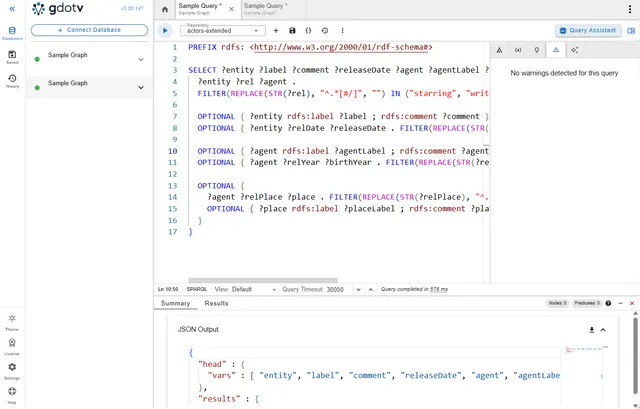
gdotv’s comprehensive SPARQL query editor comes with syntax highlighting, autocomplete suggestions and built-in documentation. It also features the SPARQL guardrails to check your queries against your schema
Explore, Manage and Modify your Graph
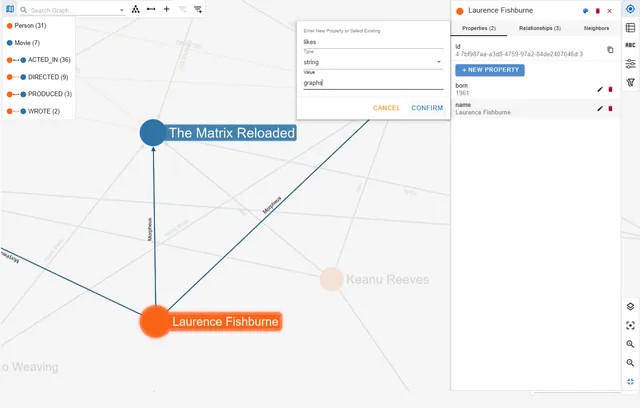
Effortlessly traverse your graph with the no-code Data Explorer, the data model view, interactive layouts, and customization panels to manage and even edit your graph on the fly.
Dashboards, Profiles and Visualization
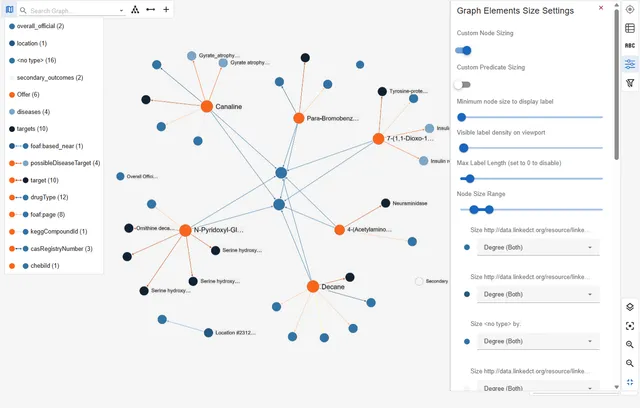
Communicate the most important elements of your graph using gdotv’s visualization and analytics tools, which are designed to convey key insights to both technical and non-technical audiences.
Try gdotv with Stardog
Query, visualize and model your Stardog data on your laptop, in your own cloud or across the whole team.
gdotv Desktop
The ultimate graph database IDE.
Install and connect your first graph database in 2 minutes.
gdotv Team
The unified workbench for graph data teams.
Deploy to your team in under 15 minutes. Marketplace or self-hosted.
gdotv Enterprise
The universal graph intelligence platform.
For organization-wide deployments. Bring graph data directly to your analysts.
About Stardog
Stardog is an enterprise-grade knowledge graph platform built around RDF and SPARQL, designed to unify disparate data sources into a single, queryable graph. It provides a feature-rich semantic graph platform for managing and querying complex connected data.
You can use gdotv to easily connect to your Stardog database, then perform essential day-to-day graph database development and management tasks such as querying, data analysis, data management, debugging, testing and visualization.
Learn more about Stardog in the Stardog documentation.
Frequently asked questions
How can I get started with Stardog and gdotv?
Getting started with Stardog and gdotv is easy. It’s just one simple installation, available on Windows, macOS and Linux. No prerequisites, additional configuration or installation required. You can get started in seconds.
gdotv automatically detects your connection setting requirements based on your database hostname and prompts you for the required information for an easy onboarding experience.
Want a step-by-step walkthrough? Make sure to check out our demo, Get Started with Stardog + gdotv on YouTube.
What’s the advantage of using RDF over LPGs?
Graph databases typically fall into two models: Resource Description Framework (RDF) and Labeled Property Graph (LPG).
The RDF model is used by Stardog and refers to a highly standardized form of data management. Information is stored as a series of directed “triple” statements connecting a subject, predicate and object together. In addition, various languages built on RDF (such as RDFS and OWL) allow the construction of sophisticated ontologies and semantic reasoning.
The LPG model covers a broad class of databases that use nodes, edges, properties and labels to represent graphs. They are optimized for real-time use and excel in applications like fraud detection, social network analysis and recommendation algorithms. There are a wide range of methods to enforce schema compliance, with flexible conventions and definitions.
RDF is a rigorous framework with well-established vocabularies. The highly developed semantic structure makes it a powerful tool for inferring relationships and new insights from data. The high level of standardization in RDF also makes it ideal for inter-compatibility, as data from disparate sources can be integrated with ease. This makes RDF ideal for applications in large knowledge graph construction and research.
How do the SPARQL query guardrails work?
A SPARQL query engine performs no semantic inference over the stencil you define; it simply evaluates patterns and returns the nodes and edges that match them. As a result, a query can be syntactically valid, executable by any compliant engine, and even return results, while still being semantically meaningless with respect to the underlying data model.
In gdotv, the query guardrails surface this problem before execution and even while the query is being written, giving you immediate, context-aware guidance. The system can infer, for example, if a predicate implies a specific kind of subject or object from those provided by the query.
What graph data visualization scenarios do our customers implement?
Organizing data derived via powerful data visualization tools has several real-life applications. Graph visualization and analysis resources allow users to make informed decisions based on actual data. Here are a few examples of the type of companies or clients that can leverage Stardog along with the robust data visualization aspect offered by gdotv:
- Data scientists and managers: Visual data analysis allows users to uncover and understand emerging patterns and relationships between data points, discover valuable insights to make informed decisions on ways to transform business processes.
- Cyber security groups: Build security graphs to represent protected assets, infrastructure, code dependencies or networks and visualize the connected relationships throughout the organization.
- Business intelligence analysts: Create customized reports and visualizations that can be easily executed for analysts to investigate and communicate on interaction between business data points.
- Fraud detection: Detect fraud patterns by modeling relationships between transactions and financial actors, then interactively visualize graph data to uncover and present potentially suspicious behavior.
How does gdotv secure my data?
gdotv Desktop runs locally on your device – no deployment needed and no handing over your data to a third-party system. Everything happens within your organization’s network, and we have no access to your data.
Our Team and Enterprise versions run within your own environment, providing the same security benefits.
It’s easy to install and configure too: our setup wizard gets you connected to your graph database in seconds.
Can I connect more than one database at a time?
Yes! Whether you’d like to access multiple Stardog instances, or interact with other graph vendors at the same time, gdotv doesn’t limit you to a single database. You can establish as many connections as you like from within our intuitive UI, and seamlessly switch between them.
Connecting is easy, and there’s no need to manage multiple vendor specific user interfaces. With gdotv, query and compare results from all your RDF and Labeled Property Graph databases under one umbrella.
Related posts
All blog posts
RDF Support Is Now Available in gdotv [v3.41.99 Release Notes]
Learn more about how the latest release of gdotv now supports RDF triplestores and the SPARQL query language with autocomplete, visualization, and more.
The Weekly Edge: European Railways, Norwegian Weather, Metallic Graphs & more
Discover what’s new this week in graph technology: querying timeseries via SPARQL, SHACL-DS validates European Railways, and Stardog’s LLM-first rebrand.