Announcing Apache AGE Support, RDF Expansion, a Brand-New Interface, Updated Labels & More [v3.48.105 Release Notes]

Just in time for the holiday season, another version of gdotv is here! Just like our release last month introducing RDF support, this is a big update.
The team has been hard at work, and we’re excited to announce that the latest version of gdotv now includes:
- Support for Apache AGE for graph data on Postgres
- Expanded support for RDF triplestores, including RDFox, Apache Jena Fuseki, RDF4J, and Blazegraph
- A brand-new user interface to make your day-to-day graph work smoother
- Lots of extra goodies like dynamic graph labels and more
As always, we sincerely hope this whole host of updates and improvements makes your experience with graph technology more effective – and more enjoyable.
Shall we take a look?
Support for Graphs on Postgres via Apache AGE
It’s a feature that you’ve requested many times, and it’s finally here!
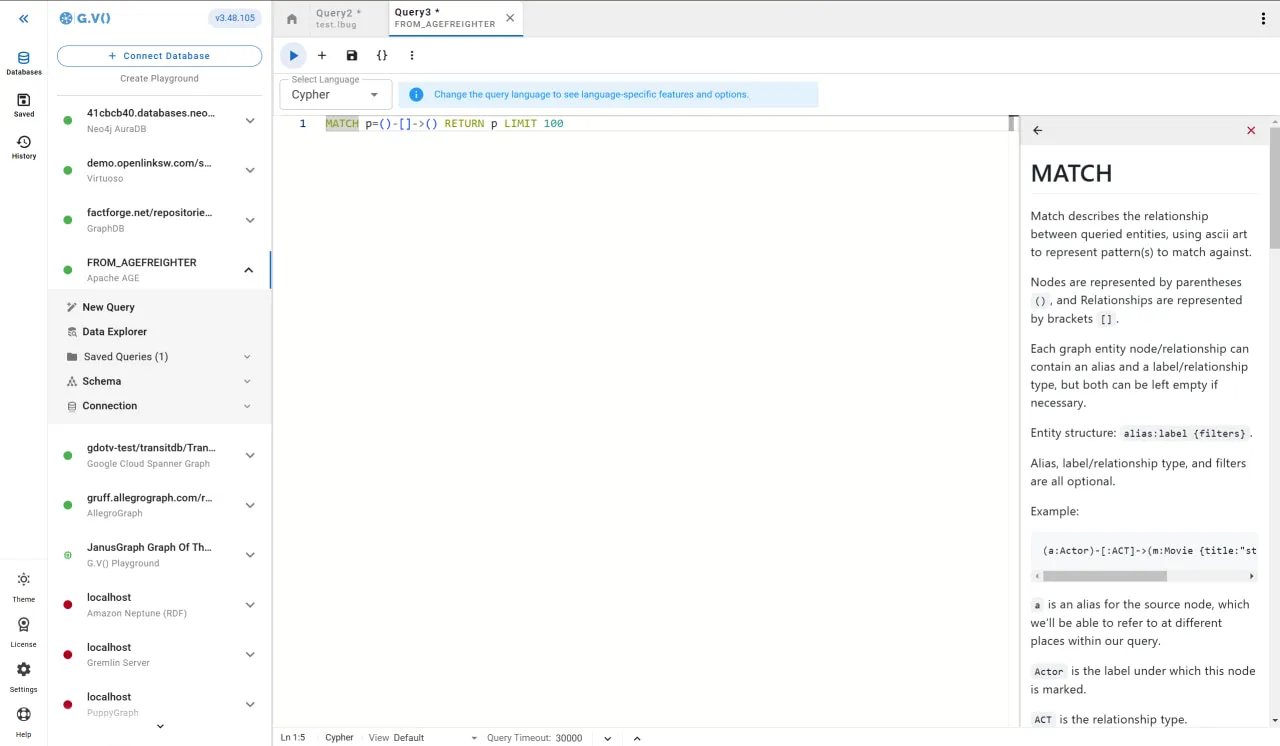
gdotv is now fully compatible with Apache AGE™ (“A Graph Extension”) for Postgres. If you’re not familiar with it, Apache AGE is a PostgreSQL graph database compatible with PostgreSQL’s distributed assets and leverages graph data structures to analyze and use relationships and patterns in data.
Cypher query writing is seamless in gdotv as it automatically wraps your Cypher query with the necessary SQL code. But don’t worry: you can still query your database directly using SQL too.
With this integration, you get access to:
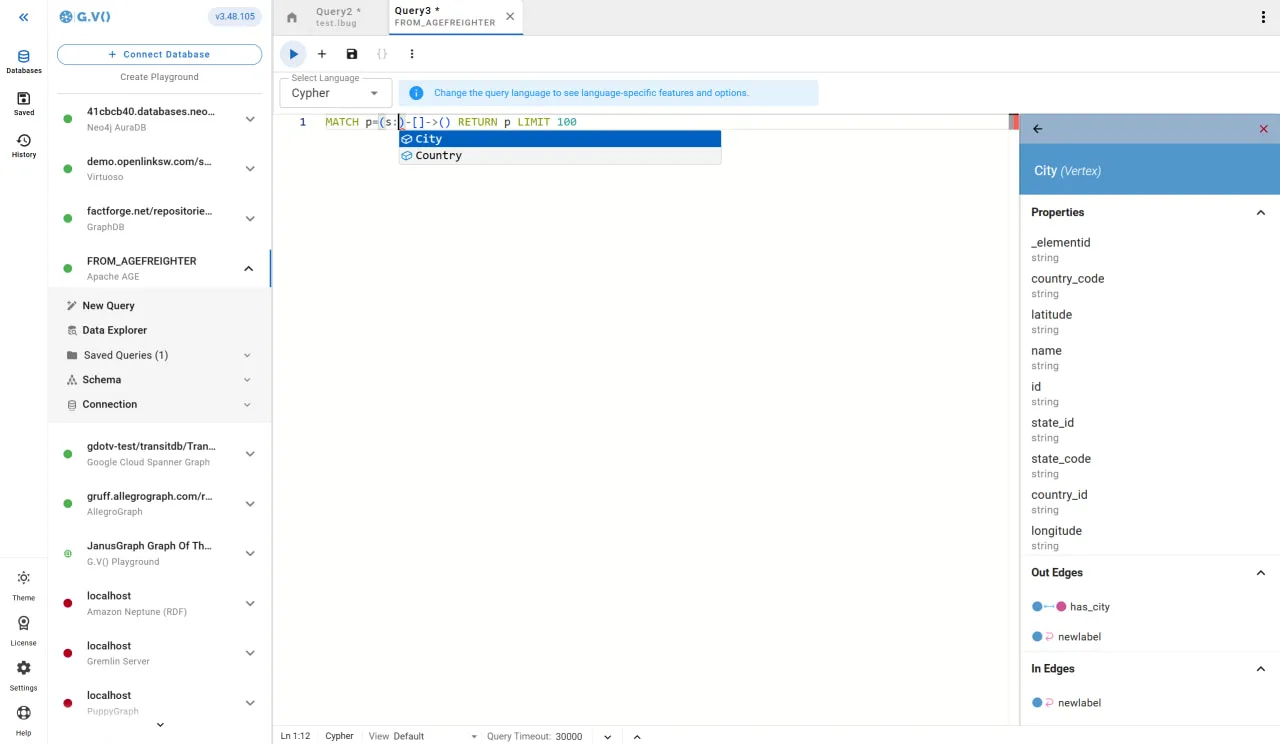
- Full Cypher query editing support with syntax validation and schema-aware autocompletion
- SQL querying
- Cypher query parameter support
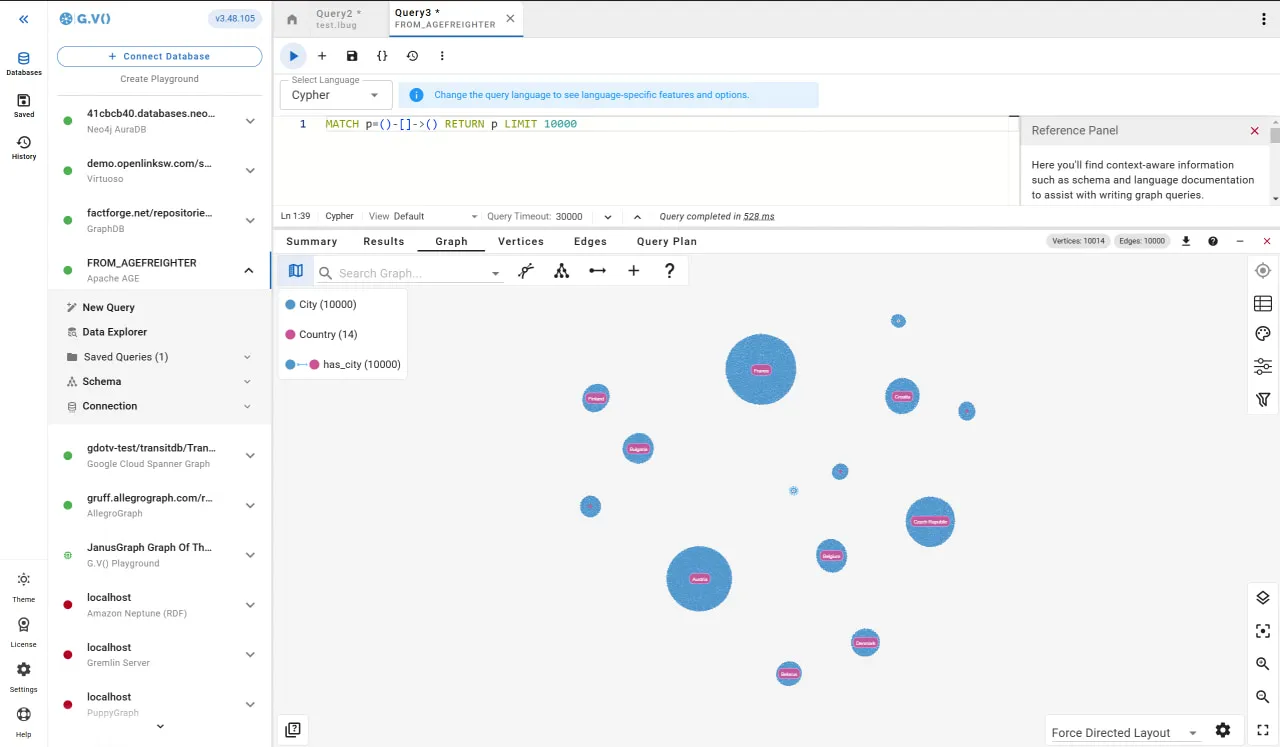
- Interactive graph visualization for your data
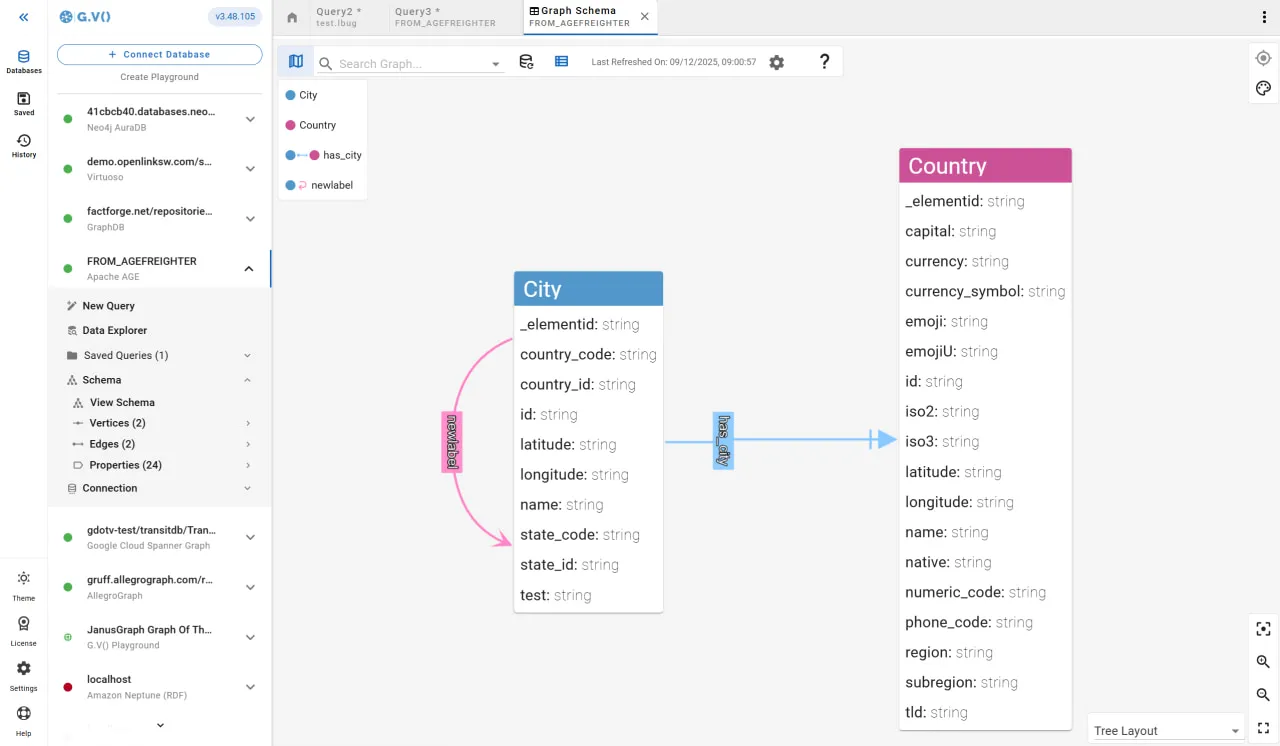
- Graph schema visualization and tracking
- Create, update, and delete functionality to easily tweak your Apache AGE graph data
- And much more!
As always, getting gdotv connected against your graph database is easy as pie, as you can see below:
And just for good measure, here’s a flurry of visuals of what you can do with gdotv and Apache AGE:
Expanded Support for RDF Triplestores & SPARQL
Building on the introduction of RDF support in the last update of gdotv, today’s new version marks the expansion of even more RDF functionality.
Here’s a quick overview:
- Full per-engine support for additional SPARQL triplestores, including RDFox, Apache Jena Fuseki, RDF4J, and the still widely used Blazegraph
- Improved support for Virtuoso, AllegroGraph, and GraphDB
- Bearer Token authentication has been added for RDF General endpoint connections, enabling secure read-only queries (such as
SELECT,ASK,CONSTRUCT, andDESCRIBE) by providing the token as the connection password - Additional improvements such as better IRI prefixification and more robust handling of
UPDATEquery reports
Keep an eye out for even more RDF updates in future!
Support for LadybugDB and Ryugraph
Since the archival of Kuzu, two main forks of the embedded graph database have emerged – LadybugDB and Ryugraph. gdotv now fully supports both of these graph databases with the same level of functionality as currently offered for Kuzu:
- Full Cypher query language support with autocomplete and syntax validation, as well as embedded documentation
- Graph data schema loading and visualization
- Interactive graph visualization and exploration, including our Cypher query builder
- Drag and drop your database file to connect instantly
Going forward, the gdotv team will be closely monitoring the progress of both forks and maintain up-to-date support for both technologies.
UX Renovations & Improvements
As you might have noticed in the screenshots above, gdotv has a brand-new UI! We hope these renovations make your graph work smoother and more intuitive.
The gdotv home page is the first big change – it’s been redesigned to make connecting to your graph database or graph query engine as simple as possible. You’ll be prompted to either connect to your existing database, or try one of the sample datasets.
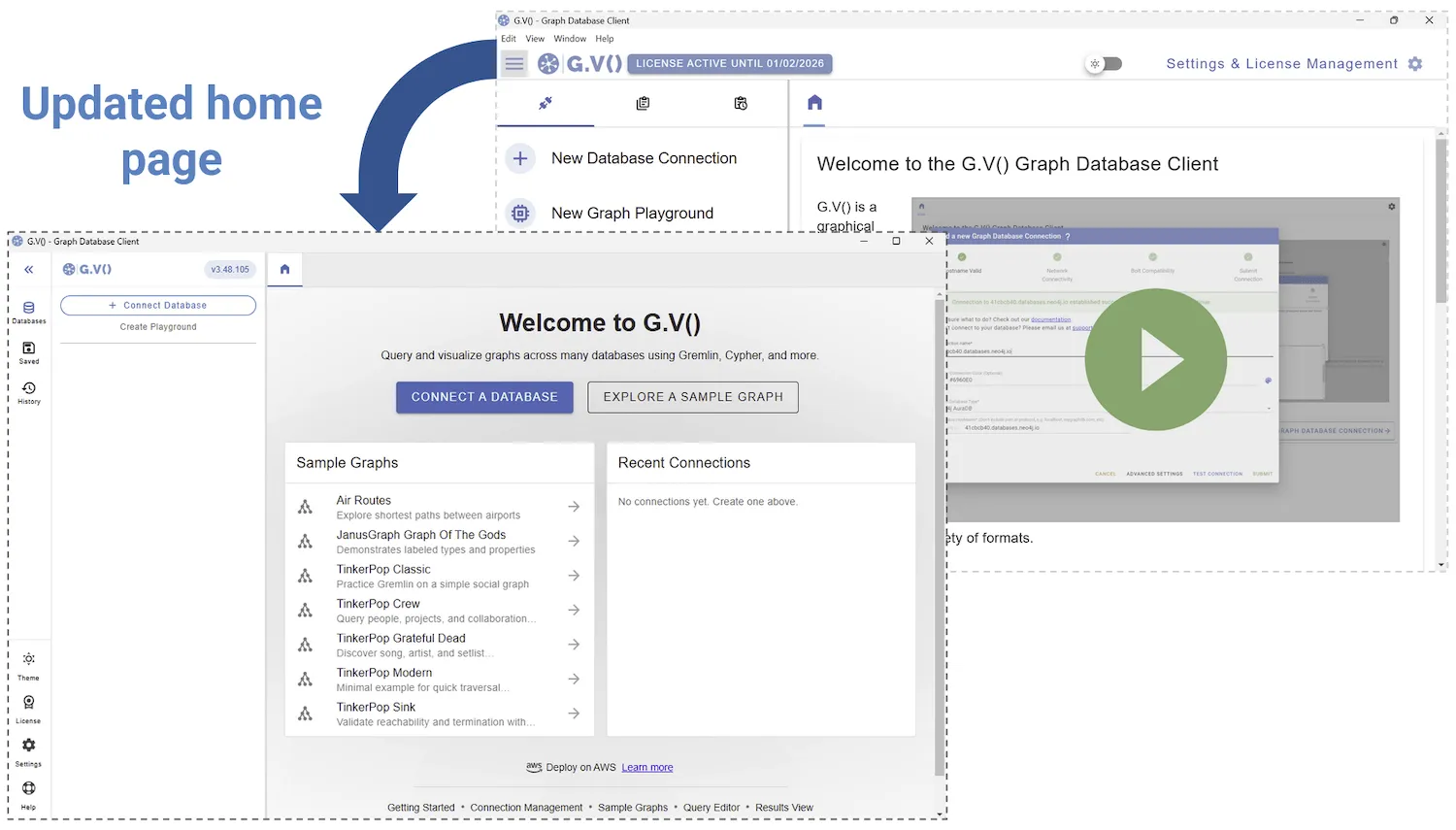
We’ve also updated the gdotv interface itself – based on your feedback – to make your experience smoother.
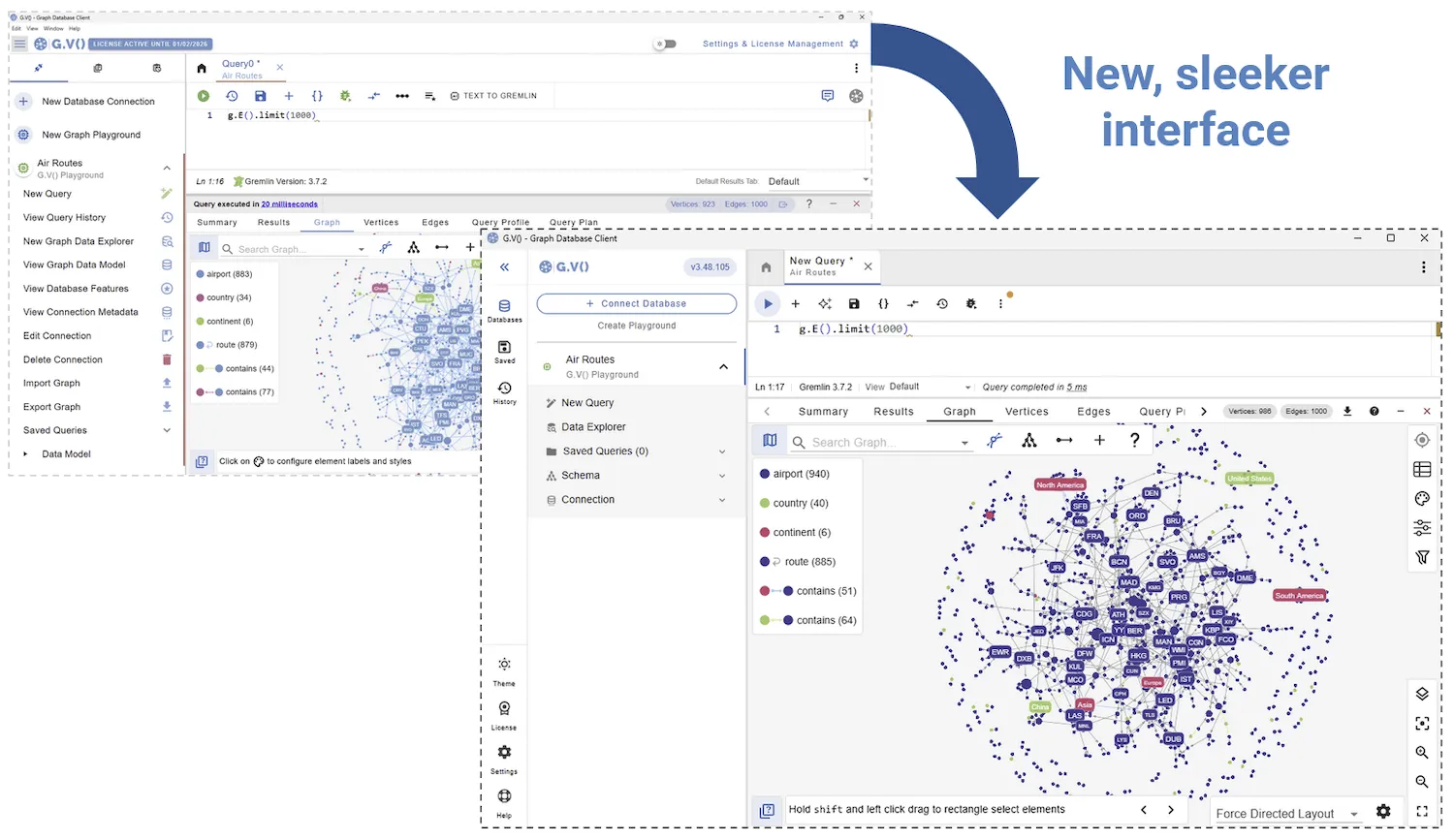
Let’s have a look at what’s changed:
- Navigation has moved to a persistent dock on the left. Database management, saved queries, and history are placed at the top for immediate access, while secondary and administrative items are grouped at the bottom.
- Saved queries are now rendered as a connected tree view with clear hierarchy lines, making deeply nested folders and queries easier to scan, expand, and reorganise at a glance.
- Per-connection colors have been removed; a single accent color now highlights the active connection across the tab bar and its query window, reducing visual noise. Tabs support right-click context menus (close, duplicate, close others, etc.) and show a query preview on hover.
- The top application bar and one status bar have been eliminated. All essential status information is now shown in a more compact query editor footer, while export actions have moved to the results tab bar reclaiming 72px of vertical space, giving more room for writing graph queries and viewing results.
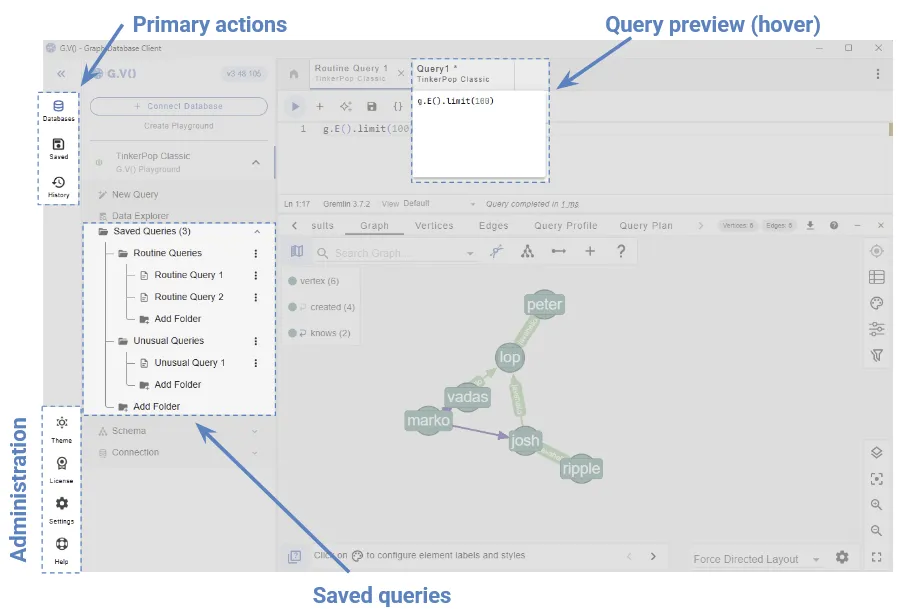
Let us know what you think of these updates!
Custom Labels for Your Graph Visualizations
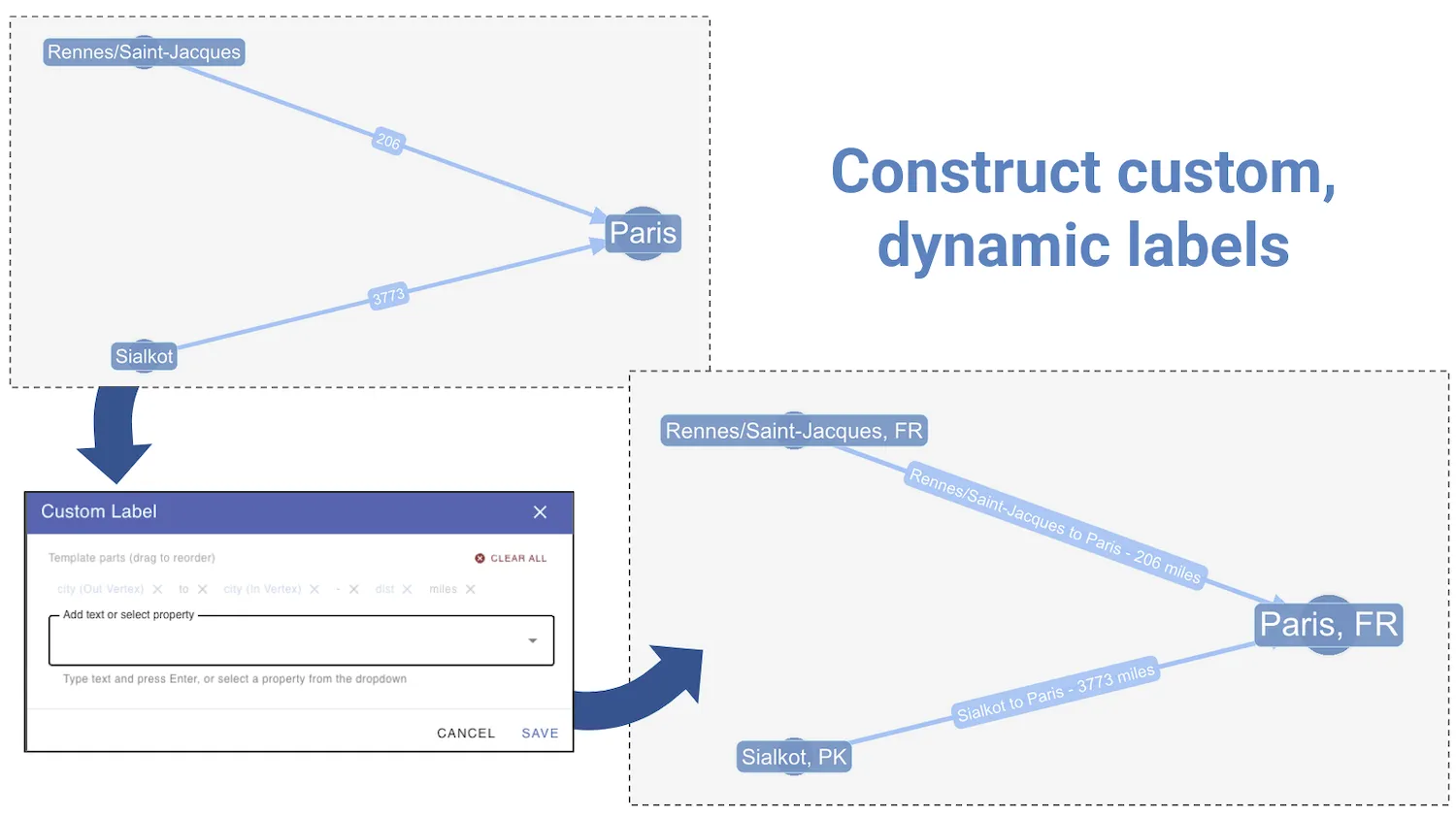
gdotv now offers the ability to create custom string templates on all of your vertex and edge labels. This feature has been requested for a while, and it’s finally here!
Previously, label captions were limited to one property, which didn’t always convey the desired meaning or offer enough flexibility. Fear not, those days are over! Now, any combination of properties and plain text can be configured to display everything you need to show. The only real limit is your screen space.
To create your custom labels, simply open the Graph Styles sidebar on the graph results view, then select ‘Custom Label’ from the list of captions next to the element label you wish to style. A dialog box will appear where you can piece together the custom template. As you can see in the images above and below, this lets you assign more intuitive and dynamic labels, such as labeling air routes edges by their ingoing and outgoing nodes.
I encourage you to experiment with this new feature and then show off your creations!
Conclusion
Well, there we have it – another gdotv release with a whole collection of big updates!
This month’s release featured everything from Apache AGE support and RDF updates to a brand-new user interface and more dynamic labeling. Phew – it’s a lot, isn’t it?
With all these updates, it’s hard not to feel excited about the rate at which gdotv is growing. With every update more user-requested features are becoming reality – all resulting in the most powerful version of gdotv to date!
Every day the team is working to continue adding functionality and improving the user experience. Keep an eye on this space, and be sure to let us know what you’d like to see in the next release!
About the author

Dr. Amber Lennox
Former Developer Relations Engineer
Amber managed developer relations at gdotv. When not deep-diving into documentation, Amber can be found wild swimming in questionable weather and working on personal programming projects like developing software for language learning. With a PhD in Astrophysics, Amber is particularly drawn to the mathematical and scientific aspects of graph theory and analytics.