
Loading Data into Apache AGE: A Practical Guide with the Air Routes Dataset

You have an Apache AGE database running and you want to put data into it. The official path is agload, AGE’s built-in CSV loader. It’s fast, it’s the one the AGE docs document, and for well-formed CSVs it gets you a typed graph in two function calls.
This post walks through agload end-to-end against a synthetic air-routes-shaped dataset: around 3,500 airports and 20,000 routes, derived from the sample data shipped with the agefreighter project and re-hosted in a directly loadable form.
This is part 3 of a 4-post series on Apache AGE.
Setup assumptions
This post assumes you have AGE running locally via the Docker setup from part 2 of this series (the apache/age:latest container, exposing Postgres on localhost:5432, with the password password). Every command below is written to be copy-paste runnable against that setup.
If you have AGE running somewhere else (a managed cloud Postgres, a different self-hosted setup, or anything in between), the SQL and Cypher commands work the same; only the connection step and the way you get CSV files onto the database server change.
Running the SQL/Cypher commands
You can run the SQL and Cypher commands below in any of the following ways. Pick whichever is most comfortable:
# Via docker exec into the running container's psql
docker exec -it age-postgres psql -U postgres

# Via a host-side psql against the container
psql -h localhost -U postgres
You can also use any GUI Postgres client (DBeaver, pgAdmin, JetBrains DataGrip, etc.) or a graph-aware tool like gdotv. gdotv runs both regular SQL queries and Cypher queries directly (without making you wrap them in cypher(...) AS (...)). Part 4 of this series covers gdotv with AGE in detail.
Getting the CSVs
We host two files:
- airports.csv: vertex file. Columns:
id, name, city, country, iata, icao, latitude, longitude, altitude, timezone, dst, tz. - routes.csv: edge file. Columns:
start_id, end_id, distance.
A note on the data: it’s synthetic, with generated airport names and IATA codes (e.g. “East Annatown Airport”). It’s well-shaped for testing the loading flow, but don’t expect to recognize real airports in the result.
agload reads CSVs from the database server’s filesystem (which, for the Docker setup, means inside the container). Download once and docker cp them in:
mkdir -p age-data
curl -o age-data/airports.csv https://dl.gdotv.com/sample-data/apache-age-load-example/airports.csv
curl -o age-data/routes.csv   https://dl.gdotv.com/sample-data/apache-age-load-example/routes.csv

docker cp age-data/airports.csv age-postgres:/tmp/airports.csv
docker cp age-data/routes.csv   age-postgres:/tmp/routes.csv
After this step, both files are available inside the container at /tmp/airports.csv and /tmp/routes.csv.
CSV format expectations
agload is opinionated about the shape of its input. The two files above already match these expectations, but it’s worth knowing the rules in case you adapt the pattern to your own data:
- Vertex files: the first column is the vertex’s id (a numeric identifier you control), and the remaining columns become properties. The header row’s column names become the property keys.
- Edge files: the first two columns are
start_idandend_id(referencing vertex ids you previously loaded), and the remaining columns become edge properties. - Type inference: each cell’s type is read from how it’s written. Quoted values become strings (
"London"). Unquoted whole numbers become integers (83). Unquoted decimals become floats (51.4775). Literaltrue/falsebecome booleans. Empty cells become null. - Lists: not directly supported. If you need a list-valued property, load it as a string and split it post-load with a Cypher update.
The main thing to get right is making sure numeric and boolean cells are unquoted in your CSV. If every cell is quoted, every property comes in as a string and range queries, sorts, and arithmetic stop working as expected. Our hosted files quote only string columns; numeric columns (latitude, longitude, altitude, distance) and ids ship unquoted.
Verify the exact function signatures and CSV header expectations against the current AGE manual entry on agload for your AGE version.
Loading the graph
Connect to the database, set up AGE, create the graph, and load:
CREATE EXTENSION IF NOT EXISTS age;
LOAD 'age';
SET search_path = ag_catalog, "$user", public;

SELECT create_graph('air_routes');

SELECT load_labels_from_file('air_routes', 'airport', '/tmp/airports.csv');
SELECT load_edges_from_file ('air_routes', 'route',   '/tmp/routes.csv');
The first three statements are the standard per-session AGE setup (covered in parts 1 and 2). create_graph(...) initializes the graph. The two load_*_from_file(...) calls do the actual loading; on a fresh graph, AGE creates the airport and route labels implicitly as part of the load.
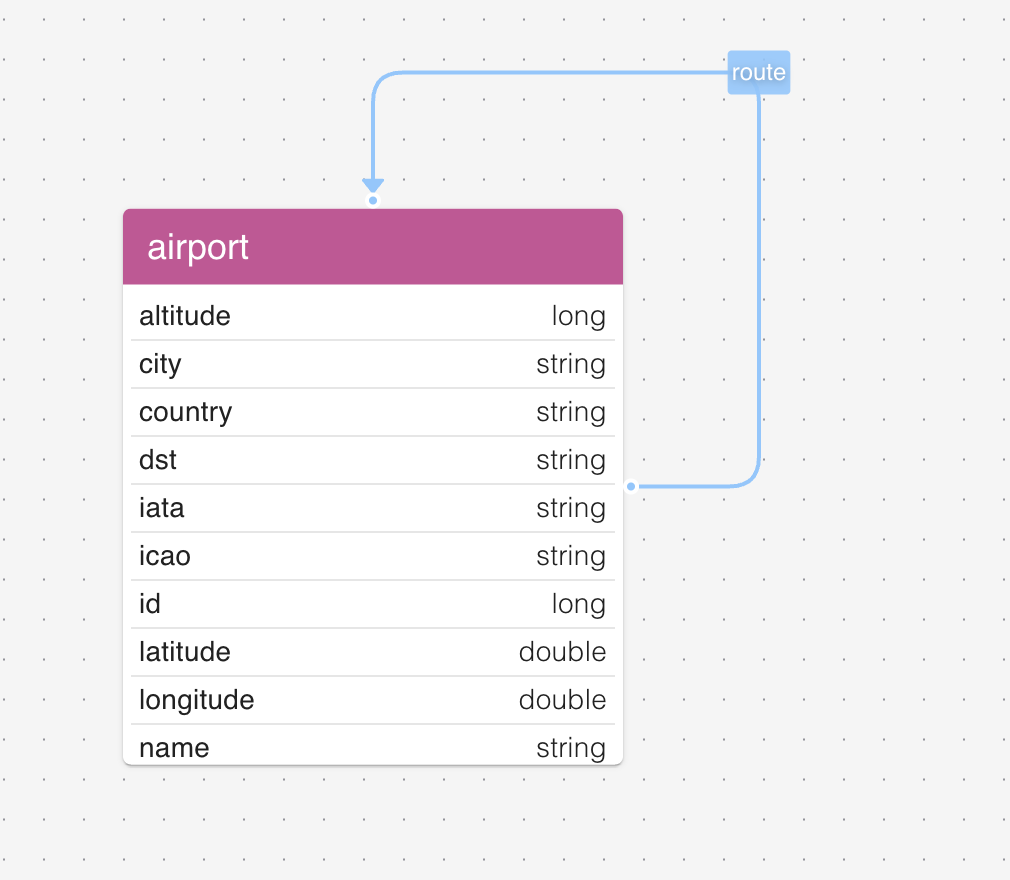
After this completes, the schema looks the way you’d expect: ids are integers, latitudes and longitudes are doubles, altitude is an integer, distance on routes is an integer, and the text columns stay text.
Verifying the load
Sanity-check the load with a few Cypher queries:
SELECT * FROM cypher('air_routes', $$
  MATCH (a:airport) RETURN count(a)
$$) AS (count agtype);

SELECT * FROM cypher('air_routes', $$
  MATCH ()-[r:route]->() RETURN count(r)
$$) AS (count agtype);

SELECT * FROM cypher('air_routes', $$
  MATCH (a:airport)-[:route]->(b:airport)
  RETURN a.iata, b.iata, a.city, b.city LIMIT 10
$$) AS (a_iata agtype, b_iata agtype, a_city agtype, b_city agtype);
The first two confirm the totals. The third spot-checks that the edge structure points where you expect, and that property values came across with the types you wanted.
Cleaning up (optional)
We recommend keeping the loaded graph around for part 4, which connects gdotv to it and explores the data interactively. If you’d rather start fresh, here are the options.
To clear the graph contents but keep the graph itself (and the labels) in place:
SELECT * FROM cypher('air_routes', $$
  MATCH (n) DETACH DELETE n
$$) AS (n agtype);
DETACH DELETE removes each matched vertex along with any edges attached to it.
To drop the entire graph (schema, labels, catalog entries):
SELECT drop_graph('air_routes', true);
The true second argument cascades the drop.
Where this fits in the series
- Part 1: Apache AGE Explained: how does it work and how does it fit in the Graph Database Landscape?. Background reading on what AGE is, how it stores graphs, and how it compares to popular alternatives.
- Part 2: Running Apache AGE: Docker Quickstart and Cloud Postgres Provider Landscape. How to actually get an AGE instance running, locally or in the cloud.
- Part 4: Visualizing Apache AGE: Connecting gdotv and Exploring the Air Routes Graph. Now that the air routes graph is loaded, the next post connects gdotv to it and walks through schema discovery, the Cypher editor, graph visualization, and interactive neighbor exploration.