RDF and SPARQL
Provider Support
gdotv supports most major RDF providers, including Amazon Neptune, Stardog, QLever, Tentris, AllegroGraph, and Virtuoso. It also provides compatibility with widely used open-source RDF triplestores such as RDF4J, Apache Jena Fuseki, and Blazegraph. gdotv can also connect to reasoning enabled RDFox datastores. To view the available providers, open the New Database Connection window and select the RDF category.
If your target database does not appear in the list, choose RDF (Other) to connect manually.
SPARQL Queries
In the Query Editor, you can write all five types of SPARQL queries:
ASK, SELECT, DESCRIBE, CONSTRUCT, and UPDATE (e.g., INSERT, DELETE, etc.).
The execution of UPDATE queries depends on whether your connection has write permissions on the target endpoint.
You can also import your global prefixes (defined in the Default RDF Prefixes Settings) directly into the editor. Simply start typing with the prefix namespace to automatically insert it as a PREFIX declaration in your query.

While editing or reviewing a query, the Reference Panel window displays SPARQL documentation, RDF-related references, and data model details for RDF nodes and edges.
SPARQL Query Results
Depending on the query type, gdotv provides multiple result views and visualizations.
For SELECT, DESCRIBE, and CONSTRUCT queries, the following views are available:
- SPARQL-JSON View
- Table View
- List View
- Graph Visualization
- Vertices and Edges View
If the database provider supports RDF Explain, a Query Plan will also be available for SELECT queries.
For ASK and all UPDATE queries, you can view the raw SPARQL-JSON output returned by the endpoint.
In all result views, long RDF IRIs are automatically prefixified if they match any namespaces defined in the Default RDF Prefixes Settings.
Graph Visualization
To ensure consistency across both LPG and RDF graphs, gdotv retains the concept of labels for RDF nodes.
In RDF datasets:
- A node’s label is determined by its
rdf:typepredicate (if present). - If no such predicate exists, the label defaults to
<no_type>.
Edges in RDF graphs lack both types and properties.
When rendering query results, gdotv automatically recognizes RDF nodes (subjects representing entities) and draws a vertex for each.
Edges are rendered when a predicate is found either among the query result variables or within the SPARQL query patterns (e.g., constant property paths).
Editing and Viewing Node Details
All literals associated with a node are displayed and editable in the Sidebar – View Selected Item panel.
If a literal has a language tag, it is shown as @<lang>.
IRIs attached to a node that are not internal entities (for example, a person’s email address URI) are represented as separate vertices connected by edges.
Adding Literals and Vertices
You can add any number of literals to vertices by specifying:
- The literal key (predicate)
- The datatype, chosen from the list of supported types or Custom Datatype IRI... to specify an arbitrary datatype IRI that isn't in the list, for example a domain-specific XSD extension. Custom datatypes are stored and edited as plain string values; gdotv only validates that the IRI itself is well-formed, not the custom datatype's own semantics. Like literal keys, a custom datatype IRI may be entered as a prefixed IRI (see Using Prefixed IRIs below). The datatype IRI you enter is preserved and shown as the literal's native type the next time the node is loaded.
- The language tag (if applicable)
- The literal value
To add a new vertex, either the node type or at least one literal must be provided. Since all RDF data are expressed as triples, an initial triple (via a type or literal) is required to store a new vertex in the target triplestore. 
Datatype Mapping
Internally, gdotv represents every property value with a type (e.g. integer, zoneddatetime, uri) and a coarser kind (e.g. integer, datetime, uri) that drives which editor widget and filter operators are shown for it. RDF literals are mapped between this internal representation and XSD datatypes in both directions.
Reading - the datatype IRI of a literal loaded from the triplestore is mapped to a gdotv type as follows:
| XSD / RDF datatype | gdotv type | gdotv kind |
|---|---|---|
xsd:string, xsd:normalizedString, xsd:token, xsd:language, xsd:Name, xsd:NCName, xsd:NMTOKEN, xsd:NMTOKENS, xsd:ID, xsd:IDREF, xsd:IDREFS, xsd:ENTITY, xsd:ENTITIES, xsd:QName, xsd:NOTATION, rdf:langString, rdf:HTML, rdf:XMLLiteral | string | string |
xsd:boolean | boolean | boolean |
xsd:byte, xsd:unsignedByte | byte | integer |
xsd:short, xsd:unsignedShort | short | integer |
xsd:int, xsd:integer, xsd:unsignedInt, xsd:negativeInteger, xsd:nonNegativeInteger, xsd:nonPositiveInteger, xsd:positiveInteger | integer | integer |
xsd:long, xsd:unsignedLong | long | integer |
xsd:float | float | float |
xsd:double | double | float |
xsd:decimal | decimal | decimal |
xsd:base64Binary, xsd:hexBinary | byte[] | bytes |
xsd:anyURI | uri | uri |
xsd:duration, xsd:dayTimeDuration, xsd:yearMonthDuration | duration | duration |
xsd:date, xsd:time, xsd:dateTime, xsd:dateTimeStamp, xsd:gYear, xsd:gYearMonth, xsd:gMonth, xsd:gMonthDay, xsd:gDay | timestamp | datetime |
rdfs:Resource, xsd:anyType, xsd:anySimpleType | object | object |
Any other datatype IRI (a custom or domain-specific one not in this list) falls back to string so the value stays editable. The original IRI is preserved as the literal's native type (shown as a badge in the UI) rather than discarded.
Writing - when you create or edit a literal, its gdotv type is mapped back to an XSD datatype:
| gdotv type | XSD datatype used on write |
|---|---|
string, uuid | xsd:string |
boolean | xsd:boolean |
byte | xsd:byte |
short | xsd:short |
integer | xsd:integer |
long | xsd:long |
float | xsd:float |
double | xsd:double |
decimal | xsd:decimal |
byte[] | xsd:base64Binary |
uri | xsd:anyURI |
date | xsd:date |
time, localtime, zonedtime | xsd:time |
timestamp, localdatetime, zoneddatetime | xsd:dateTime |
duration | xsd:duration |
If the literal being edited already carries an XSD datatype outside this list (for example xsd:gYear, xsd:unsignedInt, or a custom datatype IRI preserved from the read mapping above) gdotv writes that exact original datatype back instead of collapsing it to one of the types above, keeping round-trip edits lossless for datatypes gdotv has no dedicated type for.
Adding Edges
When creating a new edge, only the edge IRI (predicate) can be entered.
In RDF, edges cannot have their own literals or properties. 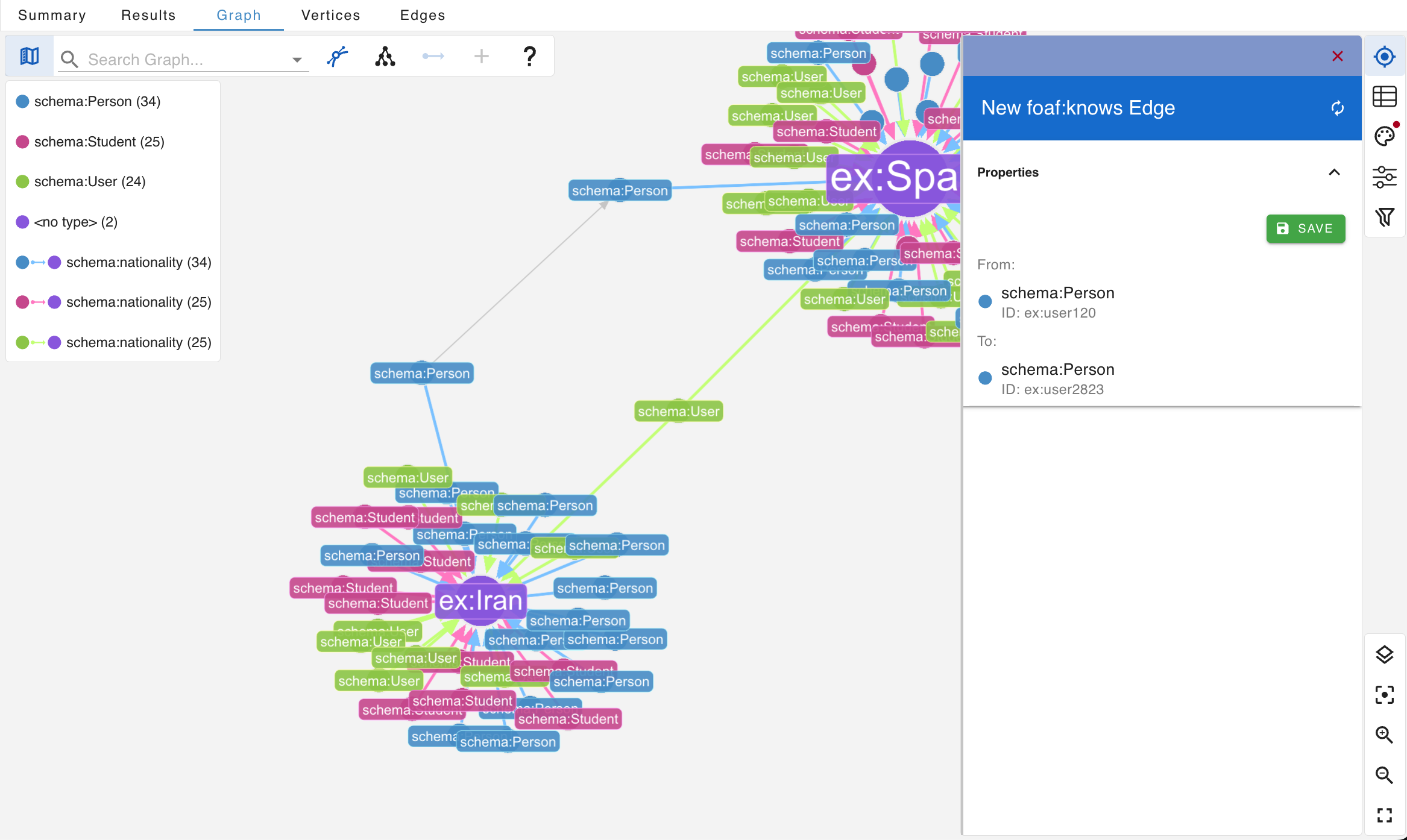
Using Prefixed IRIs
While entering key–value pairs in the Graph Visualizer, you may use prefixed IRIs.
gdotv automatically expands these IRIs based on the namespaces defined in the Global RDF Prefix Settings.