gdotv Is Now Compatible with Memgraph, the Light & Powerful Graph Database

Big news today for Memgraph users: gdotv graph database client is now compatible with Memgraph!
If you’re new to this corner of the graph ecosystem, Memgraph is a high-performance, real-time graph database designed for developers, engineers, and data teams who need instant insights from connected data. Unlike traditional databases, Memgraph runs at C++ speed, supports high-throughput ingestion, and executes real-time data analytics without complex tuning.
The light and powerful Memgraph platform includes the Memgraph Graph Database, MAGE graph algorithm library, and Memgraph Lab. It comes with a rich suite of pre-built deep path traversal algorithms and a library of traditional, dynamic, and ML algorithms tailored for advanced graph analysis, making Memgraph an excellent choice for analyzing data, relationships, and dependencies quickly and efficiently. (And in case you missed it, Memgraph 3.0 is out now.)
gdotv complements the speed and performance of Memgraph with robust developer tooling, interactive data exploration, and detailed graph visualization. In the article below, we’ll take a closer look at everything you can do with gdotv and your Memgraph database, including key differences from Memgraph Lab.
gdotv Setup & Connection for Memgraph Users
Connecting gdotv to your Memgraph database is quick and straightforward.
First, select “Memgraph” from the dropdown menu, then enter your hostname and any required credentials (depending on your setup).
And that’s it. Easy, right?
Querying Your Memgraph Database Using gdotv
Once you’ve got your graph database connected, you can immediately start querying it. Memgraph uses Cypher for their query language, and the gdotv query assistant helps you with autocomplete and suggestions specific to your database.
Here’s an example Cypher query using gdotv for Memgraph:
Just like in Memgraph Lab, gdotv lets you save and organize your Cypher queries. These are called “Collections” in Memgraph Lab. This means you and your team can run your most frequent queries in gdotv without having to type them up each time or save them elsewhere.
(See below for more of the key similarities and differences between gdotv and Memgraph Lab.)
Visualize Your Memgraph Data in Multiple Formats
Once you run your Cypher queries in gdotv, you can easily visualize the results in a variety of formats. When it comes to graph visualization, gdotv gives you the options to customize how your graph looks and feels with style sheets, colors, sizes, and forced layouts/patterns.
Of course, not every use case needs (or benefits from) graph visualization. gdotv offers multiple other formats to visualize your query results, including:
- JSON output
- Tabular results for nodes and edges (or both)
- Results summary (i.e., database statistics, server info, etc.)
Here’s a quick walkthrough of all the available data visualization formats:
The Explain Query function in gdotv also allows you to do complete Cypher query profiling, enabling you to dive deep into the performance and route of your query. Query profiling is essential for tuning and debugging your slower Cypher queries, and gdotv helps make the process easy for you.
View Your Graph Data Model
Because graph database models are so flexible and versatile, that also means it’s easy to lose track of your current model as new data is added or enriched over time. This is all the more true if you’re a backend team all working with the same database. Fortunately, gdotv helps you keep track of your graph data model as it evolves.
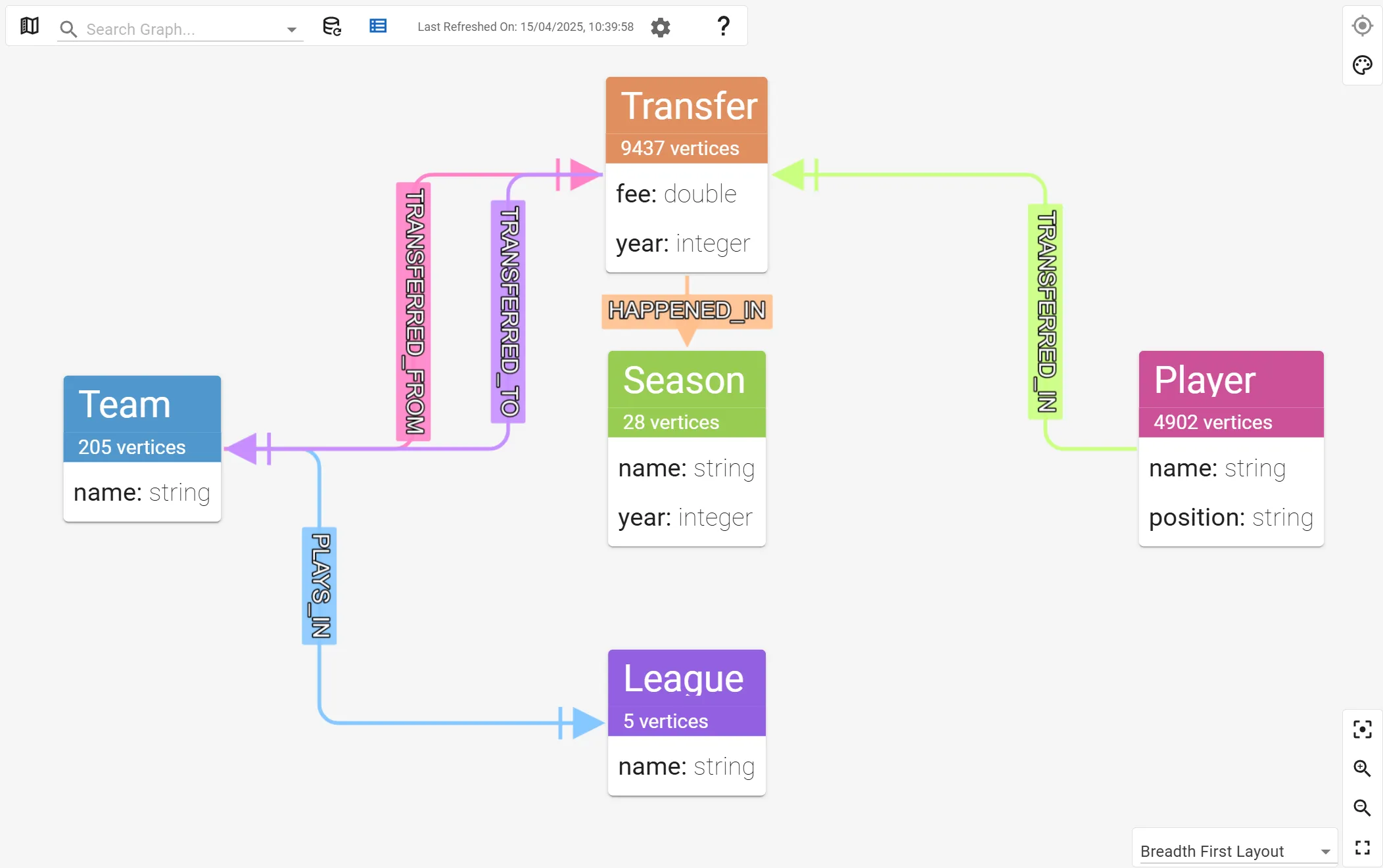
With gdotv, you can visualize the data model of your Memgraph database using a number of layouts. The graph data model shows the relationships between all your different node types as well as the number of nodes that share a common label.
Explore Your Memgraph Data Interactively
Using the Graph Data Explorer in gdotv, you can dive deep into your graph data and explore it interactively. gdotv lets you select and load specific elements and filter according to properties, labels, and more.
Here’s an example of the Graph Data Explorer in action:
The interactive navigation allows you to click on any element and load more data interactively, clicking through and filtering any new elements as you go. You can also edit data directly as you explore – no need to use a separate tool or feature just to tweak your data.
Memgraph Lab vs. gdotv : What Are the Key Differences?
Memgraph Lab is a great data visualization and exploration tool that ships with Memgraph Database. gdotv and Memgraph Lab have a lot of overlap, but they ultimately serve different purposes and functions.
Both tools offer basic querying and data visualization options, but here are a few features that make gdotv unique:
Switch between Multiple Queries with Tabs
gdotv allows you to run multiple queries, explorations, or other tasks on the same Memgraph instance using any number of tabs. This means you can switch back and forth between different tasks with ease.
Explore & Edit Your Graph Visualization in Detail
When you use gdotv, you can take your graph visualization and exploration full screen, with multiple layout options, and with granular detail for labels, properties, and more.
You can also edit and tweak data on the fly without having to run extra queries elsewhere – edits are applied to the database directly.
Leverage Query Parameters for Efficient Reporting
As mentioned above, both gdotv and Memgraph Lab allow you to save and organize your Cypher queries. gdotv also supports query parameters, enabling you to insert a parameter (like $name for example) and then enter different values for that parameter (like Jon Snow or Jaime Lannister) at the time of your query.
The advantage of using query parameters is that you can save a parameterized query as a report and then easily tweak the parameter value to run multiple queries back to back without saving or re-entering a whole new query.
Conclusion
It’s great to welcome Memgraph to the gdotv family of compatible graph databases. I hope you find gdotv a helpful and effective database client for exploring your data in Memgraph.
We’re always adding more features and capabilities to gdotv – across all of our database integrations – so watch this space for more news and announcements.
About the author

Arthur Bigeard
Founder & CEO
Hey! I'm Arthur Bigeard, the CEO and Founder of gdotv. I've discovered and grown a passion for graph databases in my previous jobs, which I've channeled into the making of gdotv. My mission is to create a universal, plug-and-play graph database client to simplify and accelerate the day-to-day tasks of graph data professionals.