
Gremlin Server IDE
& Graph Visualization Tool
Explore, query and visualize your graph data in Gremlin Server with gdotv.
A Purpose-Built IDE for Gremlin Server Developers
Traverse your graph with Gremlin!
gdotv is a user-friendly graph visualization tool for Apache TinkerPop™ and Gremlin Server. With gdotv, you streamline day-to-day operations on your graph database. From queries to data exploration, take advantage of a wealth of Integrated Development Environment (IDE) features. Using the gdotv graph database client ensures you get the most out of your data.
As a Gremlin visualization client, gdotv is especially built to offer you a comprehensive and intuitive Gremlin development suite with a feature-rich interface boasting a comprehensive list of Apache TinkerPop™-compatible tools. gdotv allows you to effortlessly turn complex data from the Gremlin database into actionable formats.
Integrating gdotv with Gremlin Server allows you to interact with Gremlin-hosted graph databases that integrate with the Apache Tinkerpop™ framework, including:
- Amazon Neptune
- Aerospike Graph
- Microsoft Azure Cosmos DB
- JanusGraph
- and many more
 Gremlin Server
Apache TinkerPop™
Query languages supported by gdotv: Gremlin
Learn more about Gremlin Server
![[Gremlin images licensed under Apache License 2.0.]](https://gdotv.com/wp-content/uploads/2026/02/tinkerpop-group.png "tinkerpop-group")
An Overview of Gremlin Server
Besides being the home of the indefinable entity known as Gremlin and his friends, Apache TinkerPop™ is an open source graph computing framework for both OLTP graph databases and OLAP graph analytics systems. The Apache TinkerPop™ framework applies to many real-life use cases such as fraud detection, Customer 360, supply chain management, real-time personalized recommendations, and many more.
Developers can model these domain-specific problems as a graph data structure consisting of objects (vertices) relating to one another via relationships (edges). As a result, developers and data teams can perform efficient graph analytics operations and create holistic views of interconnected data.
Gremlin Server is a component of the Apache TinkerPop ecosystem that allows you to host and remotely access and analyze graph data in a database. It uses Gremlin, a data flow language, that enables expressive complex traversals (queries) of the data with an intuitive step-by-step query syntax.
The Gremlin query language is the primary way to interact with graph databases that are compatible with Apache TinkerPop™. The framework also includes the Gremlin Console, a lightweight command-line interface client.
All of Gremlin’s features and capabilities are detailed in extensive documentation via the TinkerPop Compendium.
What’s Possible with Gremlin Server + gdotv
Easy Installation & Setup


Effortlessly integrate gdotv with your Gremlin Server graph database with a simplified plug-and-play database connector. The gdotv database client provides straightforward database connection and configuration instructions to get you started in less than a minute.
This Gremlin Server IDE is available to download for Windows, macOS, and Linux with a one-click installer to get you started instantly.
Centralized Connection Management

gdotv can be used to query and compare data from a huge range of graph database vendors – simultaneously! We don’t just work with Gremlin Server: gdotv data visualization tools fully integrate with various other graph technologies, including all Apache TinkerPop™ compatible graph databases and most LPG and RDF providers.
gdotv is fully compatible with query languages like Gremlin, Cypher, Google SQL, SQL:2023, SPARQL and more. Using an intuitive UI, you can switch between your connections and queries seamlessly.
State-of-the-Art Gremlin Editor

The gdotv Gremlin code editor is the most powerful available – it offers data schema-accurate auto completion and embedded official documentation for Gremlin to give you all the information and suggestions you need to write your Gremlin Server queries faster and more effectively.
Customizable Data Visualization
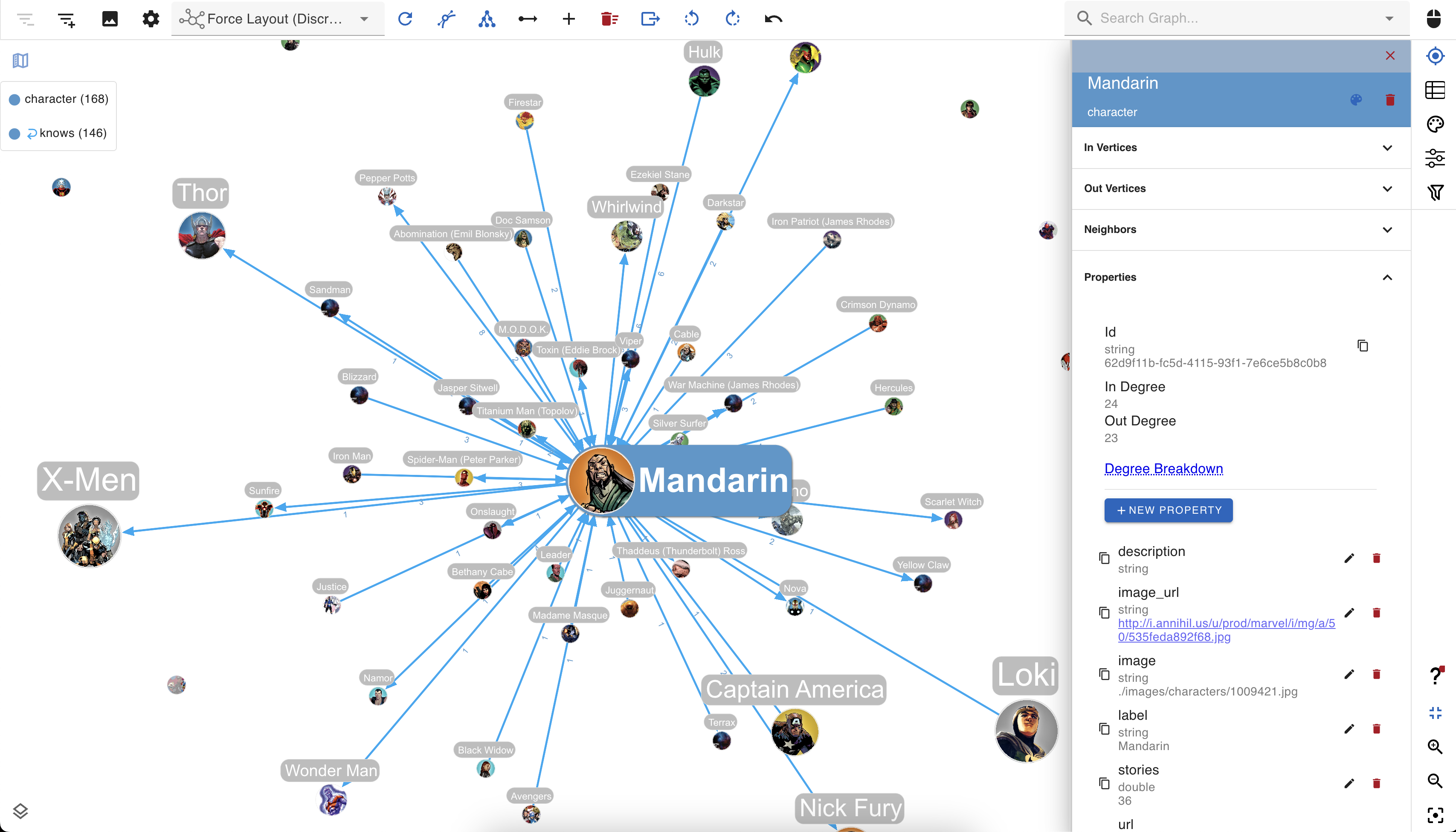
You can create custom visualization rules for your graph database with gdotv to determine the look and feel of your data.
The gdotv database client boasts easy-to-configure style options that you can use to customize vertices and edges based on their labels and property values.
You can choose any color, size, or background image and adjust other elements to match your preference.
No-Code Data Exploration with the gdotv Graph Data Explorer


Use the built-in gdotv Graph Data Explorer to navigate your Gremlin Server data without using queries.
The Graph Data Explorer allows you to define path patterns to query from your data, using filters on both your vertices and edges. Elements in the declared path can be filtered according to their label, direction, and property values, allowing you to perform complex path-pattern searches with no code.
Instantly Load & View Your Data Model
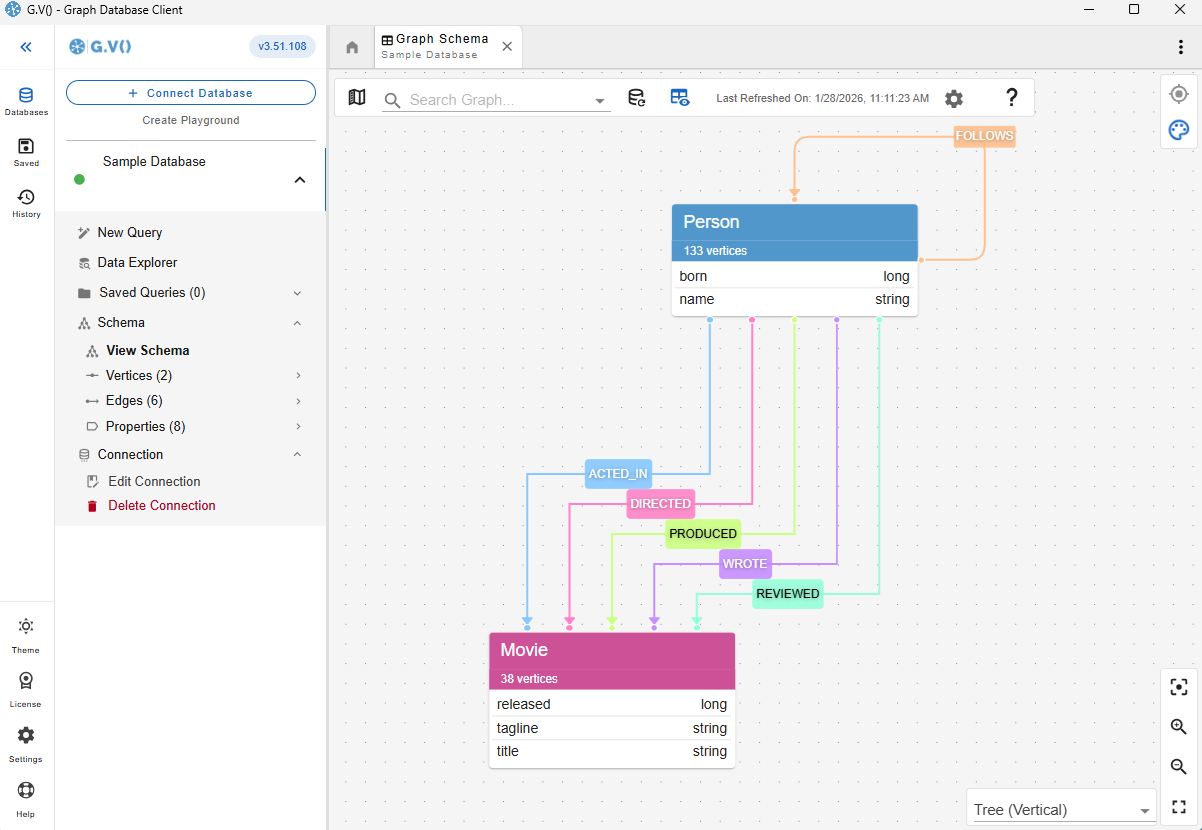
Understanding and verifying your data schema is critical component of graph management. This is why gdotv provides an overview of your data structure with the data model view.
For Gremlin Server, there is no need to provide a data model, as gdotv is able to infer the schema directly from the data itself. This is always just a click away, meaning that you always have an bird’s-eye view of your vertices, edges, and properties right at your fingertips.
Modify Your Gremlin Server Graph Data Directly within gdotv
Want to adjust something in your graph? Take a hands-on approach and manage your Gremlin Server graph directly.
Using gdotv, you can directly create, modify, and delete the edges and vertices – as well as modify the properties associated with them – allowing you to make changes on the fly.
Get Query Profiles & Traversal Explanations in 1 Click
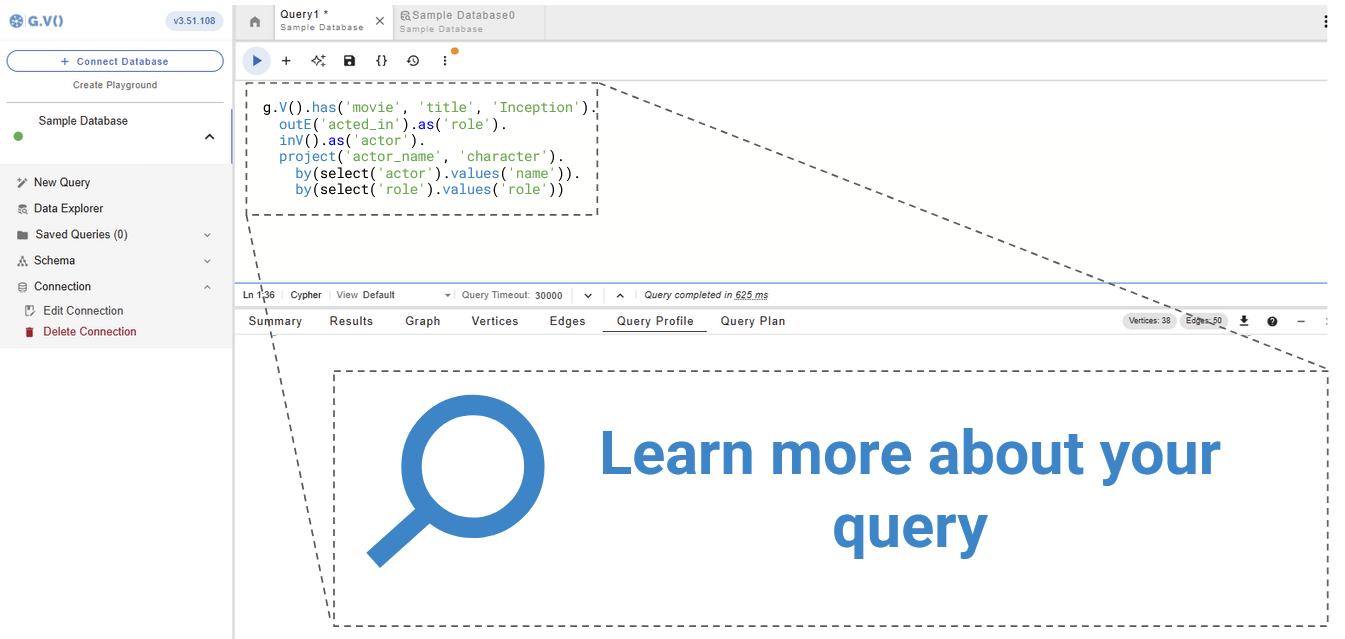
A query execution plan provides a roadmap for how your query will be executed, while query profiles provide a runtime report of how they performed. Both ensure efficient use of your graph database.
gdotv pulls the query plan from your Gremlin Server database’s own functionality and displays the results, giving you instant feedback on query execution and performance.
Take Advantage of Syntax Validation

Using gdotv language highlighting and syntax checking for Gremlin makes your code easier to understand and visually parse, warning you of any error that would prevent it from executing against your Gremlin Server instance.
Test Gremlin Server Queries with the gdotv Debugger
The combination of the gdotv query debugging and profiling toolkit gives you unparalleled control to inspect the behavior and output of your graph traversals with just a few clicks.

Unlimited, free in-memory graphs managed in gdotv
You can create and manage in-memory graphs implemented via TinkerGraph in just a few clicks. This is ideal for learning how to work with Apache TinkerPop Gremlin.
This feature is completely free and does not require an extra paid plan of any kind.
Advanced Authentication Support
Enterprise implementations of Gremlin Server sometimes have custom authentication and authorization plugins that third-party solutions struggle to integrate with due to their bespoke nature.
gdotv supports basic authentication capabilities for username/password via standard Gremlin driver functionality as well as Kerberos authentication or execution of a custom script to generate bespoke credentials on the fly.
This is ideally suited to enterprise Gremlin Server deployments that feature integrations to the enterprise’s internal user directory or that implement their own authentication and authorization module.
To find out more, check out the documentation.
Gremlin Server + gdotv Blog Posts
![gdotv Adds Multi-Graph Connections & Automatic Data Models [v3.74.142 Release Notes]](https://gdotv.com/wp-content/uploads/2026/08/multi-graph-connections-automatic-data-models-gdotv-v3-74-142-release-notes-banner-1024x768.webp "gdotv Adds Multi-Graph Connections & Automatic Data Models [v3.74.142 Release Notes]")
![Introducing pgGraph Support, Node Icons & Language-Aware Terminology [gdotv v3.63.137 Release Notes]](https://gdotv.com/wp-content/uploads/2026/06/pggraph-lang-tag-grouping-node-icons-gdotv-v3-63-137-release-notes-banner-1024x535.png "Introducing pgGraph Support, Node Icons & Language-Aware Terminology [gdotv v3.63.137 Release Notes]")
Frequently Asked Questions (FAQs)
gdotv: The Gremlin Server IDE
Turn your graph data into connected insights when you use gdotv to query, explore, and visualize your Gremlin Server graph database.
Sign up for a free trial today and discover how gdotv amps up your productivity as the perfect Gremlin Server IDE and graph visualization tool.
Or, prefer to talk with the gdotv team directly? Use the form below to get in touch.