gdotv on AWS Marketplace: Your Favorite Graph DB Client, Now in Your Browser

Introduction
Today marks the official release of gdotv on AWS Marketplace.
So far, gdotv has always been a desktop application, but it is now available directly through your web browser. Check out the official AWS Marketplace listing here or dive into the docs for gdotv on AWS Marketplace to get started.
This release marks a big shift for gdotv as a graph database client, and I’m excited to share it with you. Let’s dive into the details.
How Is gdotv for AWS Marketplace Different from gdotv Desktop?
The fundamental difference between gdotv Desktop and gdotv on AWS Marketplace is that the latter is available directly through your web browser and is not a desktop executable. This new version is instead deployed as a Docker container.
Another major difference from gdotv Desktop is the number of users available on the same deployment. Since it’s a website, gdotv on AWS Marketplace can be accessed by multiple users concurrently, and they can share configurations with one another.
Here are a few other highlights of using gdotv on AWS Marketplace:
- Write Gremlin and Cypher queries easily using the gdotv built-in query editor, with syntax checking, autocomplete and embedded documentation.
- Visualize query results across a variety of formats such as JSON, tables, graph and object browser.
- Save and organize your graph queries into folders to easily maintain curated reports for your database.
- Navigate, explore and modify your graph data interactively with the graph database visualization feature.
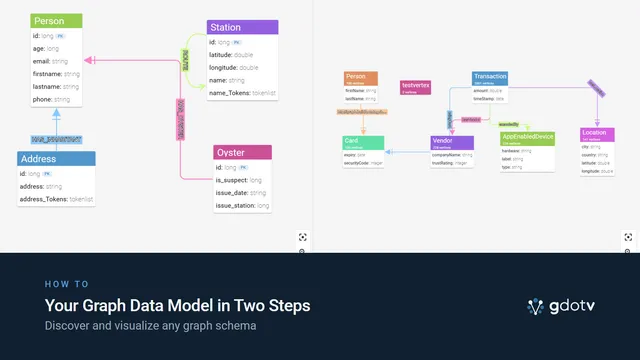
- Improve team collaboration with a centralized view of your graph data schema, which is automatically loaded and visible as an entity-relationship diagram.
- Connect as many database endpoints as you like on gdotv.
- Connect securely to your Amazon Neptune clusters using IAM authentication via EC2 instance profiles
In Case You’re New Here: A Quick Overview of gdotv
gdotv is a graph database client and IDE perfect for developers looking to start on a graph project or support an existing one.
gdotv is compatible with Amazon Neptune’s Gremlin and Cypher API, and other Apache TinkerPop-enabled graph databases such as JanusGraph, Gremlin Server and Aerospike Graph. It provides state-of-the-art development tools with advanced autocomplete, syntax checking and graph visualization.
With gdotv you can:
- View your graph database’s schema in 1 click
- Write and run Gremlin queries against your database with powerful autocomplete and syntax checking features
- Write and run Cypher queries on Amazon Neptune with powerful autocomplete and syntax checking features
- Visualize query results across a variety of formats such as graph visualization, JSON and tabular data
- Explore your data interactively with the no-code graph database browser
- Debug Gremlin queries step by step and access query profiling tools for Gremlin and Cypher
To learn more about gdotv, check out a high-level product overview or dig into the documentation. And definitely reach out as support@gdotv.com if you have any questions.
How to Get Started with gdotv on AWS Marketplace
Setting up gdotv for AWS Marketplace is easy: Follow this step-by-step guide or start from the AWS Marketplace listing.
Whether you’re new to gdotv or just excited to use it through your browser for the first time, you’ll get a free trial when you sign up. I hope you enjoy it.
About the author

Arthur Bigeard
Founder & CEO
Hey! I'm Arthur Bigeard, the CEO and Founder of gdotv. I've discovered and grown a passion for graph databases in my previous jobs, which I've channeled into the making of gdotv. My mission is to create a universal, plug-and-play graph database client to simplify and accelerate the day-to-day tasks of graph data professionals.