gdotv Now Supports pgGraph, Graph Queries on PostgreSQL

Graph questions are easy to ask of relational data and painful to answer. “Find the shortest path between these two accounts.” “Return everything within three hops of this device.” Express that as a recursive CTE in PostgreSQL and watch it fall over as the traversal gets deeper. pgGraph is a new answer to that problem, and as of our June release, gdotv turns its results into a graph you can see.
pgGraph is a PostgreSQL extension, written in Rust, from Evokoa. It adds graph traversal directly to Postgres without a separate graph database and without a migration. gdotv now connects to a pgGraph-enabled instance and gives you graph visualization, GQL query editing, and schema exploration on top. Here’s what that looks like.
What pgGraph Brings to PostgreSQL
pgGraph builds a compact, derived graph index over the relational tables you select, using compressed sparse row arrays for O(1) adjacency lookups. PostgreSQL remains as your system of record. The index is rebuildable, not a second copy of your database, and it gives you bounded BFS/DFS, shortest path, and connected components, “entirely avoiding the recursive SQL traps that normally bring Postgres to a halt at depth.”
You drive it through SQL functions in a graph schema. graph.build() compiles your relationships into the index; graph.search(), graph.shortest_path(), and graph.traverse() run the traversals. There is also a graph.gql() function that accepts a GQL-compatible query directly, which matters for the gdotv integration below.
This is a different approach from Apache AGE. AGE layers a dedicated property-graph model and openCypher onto Postgres; pgGraph indexes your existing tables and exposes traversals as functions, leaving the relational layout untouched. It sits in the graph-on-relational camp alongside engines like Oracle Graph, rather than asking you to model a separate graph.
One caveat worth stating up front: pgGraph is in early alpha. The maintainer’s guidance is plain: “even though we have tested it to be stable, please avoid production use for now.” Run it in Docker or a dedicated development database while you evaluate it. It is Apache-2.0 licensed and supports PostgreSQL 14 through 18.
Connect gdotv to pgGraph in Seconds
Connecting gdotv to a pgGraph instance is the same quick flow as any other database in the client. Enter your PostgreSQL connection details, point gdotv at the pgGraph-enabled database, and you’re ready to query.
There is no limit on concurrent connections. You can work across several pgGraph databases, or run them alongside your other graph data sources, all from the one gdotv instance.
Query pgGraph with SQL & GQL
pgGraph is driven by SQL functions, but you do not have to hand-write them. gdotv lets you write GQL directly and automatically wraps it in the SQL graph.gql() call for you, so you get a richer GQL editing experience: syntax validation and schema-aware autocomplete as you type. It’s the same approach we take for Apache AGE with Cypher.
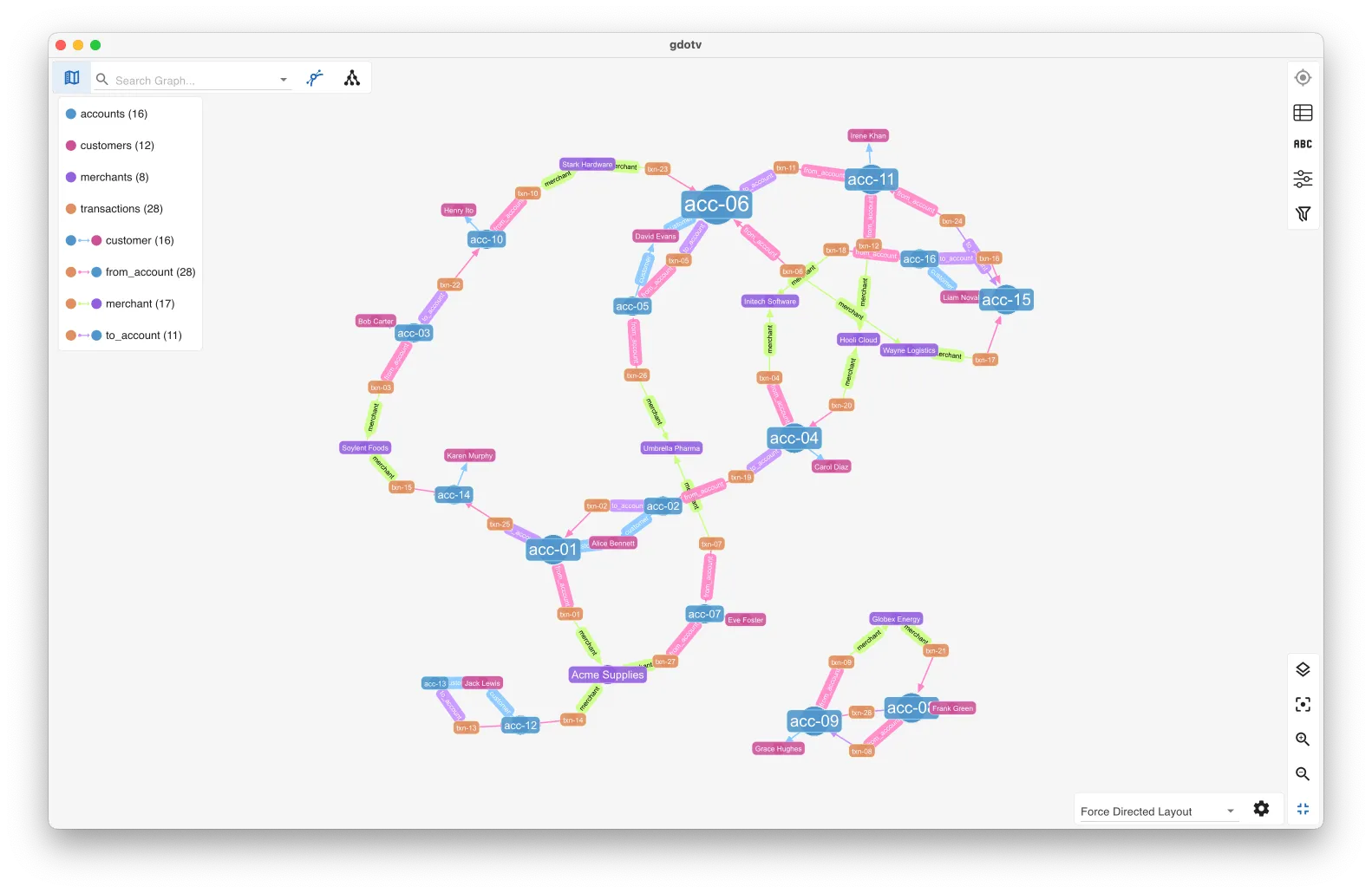
Run a query that returns graph elements and gdotv renders them as an interactive graph visualization, with layout, filtering, and styling options to make the result readable. When a graph is not the right shape for the question, the same result is one click away as a table, as JSON, or in the object browser. Prefer the raw primitives for shortest-path or neighbor searches? Run graph.shortest_path() or graph.search() as SQL and visualize those results just the same.
Explore the Graph Schema & Data Model
gdotv reads the structure of your pgGraph graph and presents it as an interactive data model, an entity-relationship view of your node and relationship types and their properties. This is only ever one or two clicks away.
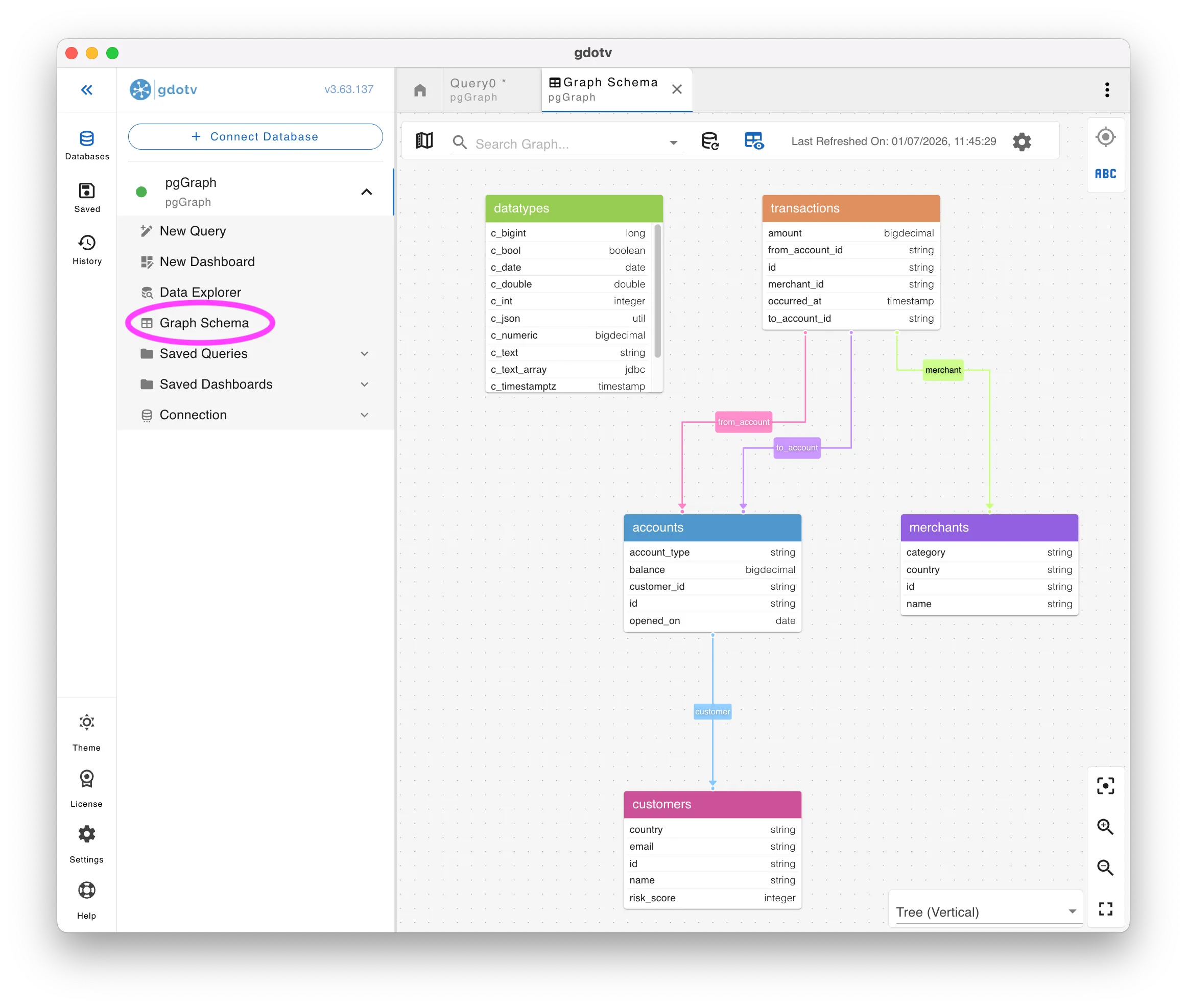
Because the index is derived from your live tables, the model gives you a fast, accurate reference point for what is actually in the graph before you write a query against it.
No-Code Exploration of Your pgGraph Data
You don’t need to write a query to explore pgGraph data in gdotv. The Data Explorer lets you build a path from the node and relationship types in your model, add property filters, and run it. gdotv generates the underlying query and turns the result into a fully interactive graph visualization.
It’s a fast way to get a feel for unfamiliar graph data, and a useful entry point for teammates who want to explore the connections without learning GQL first.
Conclusion
pgGraph opens up graph queries on the Postgres data you already have, in-engine and with no migration, and gdotv now makes those results visible, queryable, and explorable. It is early alpha, so keep it to development and evaluation for now. But if you have been curious what graph traversals over your relational tables look like, this is a low-friction way to find out.
If you are new to pgGraph, the docs will help you get an instance running. Then all you need to do is point gdotv to it.
About the author

Joe Stainke
Developer
Hey! I'm Joe Stainke, one of the gdotv development team members! As a newcomer to the graph database industry, I bring fresh perspectives on how we can improve adoption of graph technology for the masses.